 Firefox
 1 / 6
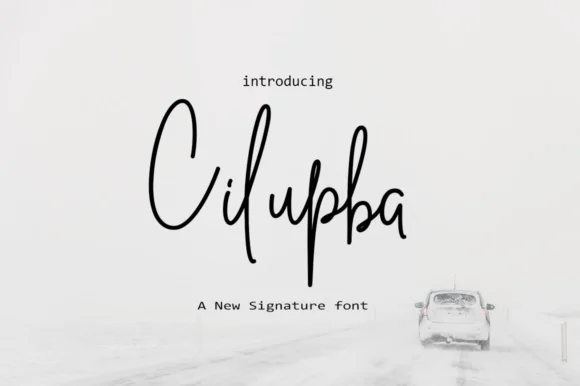
1 / 6About Cilupba Font
Cilupba by Rudistudio is a flowing calligraphic script that brings genuine handwritten elegance to contemporary design work. The font's distinctive swashes and carefully crafted letterforms create a warm, personal quality that feels authentic across diverse applications, from formal invitations to casual creative projects. Its refined character manages to feel both modern and timeless. This script truly excels in wedding invitation suites, where its romantic sensibility adds depth and refinement to special-occasion stationery. Designers frequently turn to Cilupba for sophisticated branding applications, boutique skincare packaging, luxury photography marketing materials, and premium greeting card design all benefit from its refined character. The font's balanced proportions and generous curves work beautifully for both headline impact and extended text, making it equally suitable for body copy in editorial layouts, love letters, and personal correspondence where emotional resonance matters. Beyond traditional print, Cilupba shines in social media graphics that demand personality and refinement, as well as in DIY craft projects and personalized wedding welcome signs. The font's intuitive letterforms and thoughtful spacing make it accessible for designers of all skill levels while maintaining the sophisticated quality that discerning clients expect. Its versatility spans both digital and print mediums with consistent visual impact. Discover Cilupba Font on Creative Fabrica and bring handwritten authenticity to your creative vision.
Style & Use Cases
- Overall Style
- Elegant, Flowing, Beautiful
- Use Case
- Invitations, Branding
- Ideal For
- wedding stationery, greeting cards, and signatures
- Pairs With
- a simple uppercase sans
How to Install Cilupba Font Font
Step-by-step instructions for every platform
- 1Download the Cilupba Font font file (.ttf or .otf).
- 2Locate the downloaded file in your Downloads folder.
- 3Right-click the font file.
- 4Select "Install" to install for the current user, or "Install for all users" to make it available system-wide.
- 5Cilupba Font is now available in Word, Photoshop, Illustrator, and all other apps.
More by Rudistudio
View all →
Browse fonts by theme
Curated collections →Saw a font in a picture? Identify any font from an image with our free Font Finder.
More Script Handwritten Fonts
Browse all →







What pairs well with Cilupba Font?
Cilupba Font is a script font that shines as a display or heading face. Pair it with a clean sans-serif or serif font for body text — the contrast creates a clear hierarchy while the two styles stay balanced and easy to read.




Cilupba Font
by Rudistudio
Reviewed by the FontBoxDL team · Updated May 2026