 Firefox
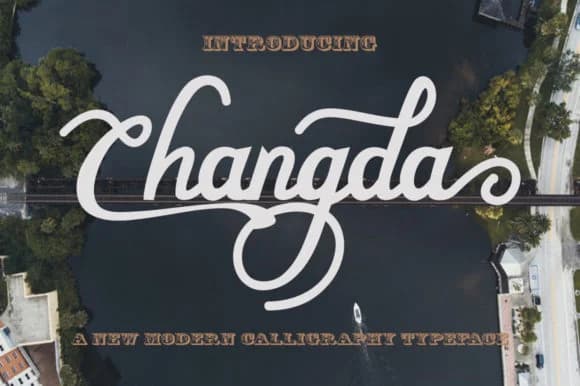 1 / 5
1 / 5About Changda Font
This handwritten font radiates casual confidence, the kind of energy that brings immediate personality to any layout. Changda, designed by faisal_Alfaraby, captures that authentic sketched quality you'd reach for in branded work where warmth and character actually matter. It's not trying too hard, which is exactly why it works.
The script flows naturally across different applications without feeling forced or overly decorative. Wedding invitation suites benefit from its genuine handmade feel, especially when paired with traditional colors and luxe paper stocks. Custom t-shirt designs gain real character and authenticity when this font anchors the composition. Letterhead and business cards take on a distinctly crafted, boutique quality that mass-produced alternatives can't match. Product labels, nameplate designs, and event badges all transform when you apply this confident stroke work. The playful baseline variations add visual depth and interest while staying legible across different sizes and print surfaces.
Pair Changda with a clean, minimal sans-serif for body text to let the script shine without competing for attention on the page. The contrast between these two gives you flexibility for everything from indie packaging to editorial design spreads. Find it on Creative Fabrica, ready to download and bring that genuine handwritten character to your next project.
Style & Use Cases
- Overall Style
- Elegant, Flowing, Signature
- Use Case
- Invitations, Branding
- Ideal For
- wedding stationery, greeting cards, and signatures
- Pairs With
- a simple uppercase sans
How to Install Changda Font Font
Step-by-step instructions for every platform
- 1Download the Changda Font font file (.ttf or .otf).
- 2Locate the downloaded file in your Downloads folder.
- 3Right-click the font file.
- 4Select "Install" to install for the current user, or "Install for all users" to make it available system-wide.
- 5Changda Font is now available in Word, Photoshop, Illustrator, and all other apps.
More by faisal_Alfaraby
View all →
Browse fonts by theme
Curated collections →Saw a font in a picture? Identify any font from an image with our free Font Finder.
More Script Handwritten Fonts
Browse all →







What pairs well with Changda Font?
Changda Font is a script font that shines as a display or heading face. Pair it with a clean sans-serif or serif font for body text — the contrast creates a clear hierarchy while the two styles stay balanced and easy to read.



Changda Font
Reviewed by the FontBoxDL team · Updated August 2026