 Firefox
 1 / 8
1 / 8About Burble Font
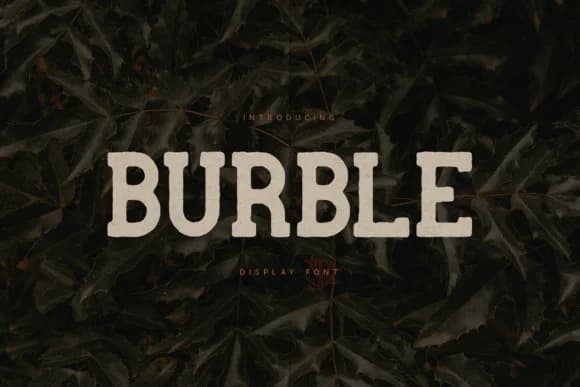
There's something honestly weathered about this typeface, substantial yet inviting, like it's been used and trusted for years. Burble, designed by vladfedotovv, is a slab serif that delivers exactly that feeling through chunky serifs and a hand-pressed character. The weathered patina strips away geometric rigidity, replacing it with an organic solidity that works equally well as a headline or brand voice.
This font earns its place in vintage branding systems and rustic identity suites. Think craft brewery labels that need grit without aggression, farm-to-table restaurant signage where warmth matters, and adventure outfitter logos that convey durability alongside approachability. Wood-grain packaging benefits from its textured presence, and architectural or heritage signage feels right at home with its period-appropriate structure. The blocky construction reads clearly at any size, holding its character whether stretched across a poster or condensed into a small logo mark.
Burble ships with a complete character set including uppercase, numerals, and punctuation across multiple languages, making it reliable for both print and web applications. Pair it with a contemporary sans-serif for contrast in editorial layouts or mixed-media campaigns, letting each typeface breathe without competing. If you're building something with roots and substance, Burble is ready to anchor your project on Creative Fabrica.
Style & Use Cases
- Overall Style
- Sturdy, Confident, Slab Font
- Use Case
- Headlines, Merch
- Ideal For
- vintage posters, logos, and product packaging
- Pairs With
- a light sans-serif
How to Install Burble Font
Step-by-step instructions for every platform
- 1Download the Burble font file (.ttf or .otf).
- 2Locate the downloaded file in your Downloads folder.
- 3Right-click the font file.
- 4Select "Install" to install for the current user, or "Install for all users" to make it available system-wide.
- 5Burble is now available in Word, Photoshop, Illustrator, and all other apps.
More by vladfedotovv
View all →
Browse fonts by theme
Curated collections →Saw a font in a picture? Identify any font from an image with our free Font Finder.
More Slab Serif Fonts
Browse all →







What pairs well with Burble Font?
Burble Font is a slab serif font that shines as a display or heading face. Pair it with a clean sans-serif or serif font for body text — the contrast creates a clear hierarchy while the two styles stay balanced and easy to read.



Burble Font
by vladfedotovv
Reviewed by the FontBoxDL team · Updated August 2026