 Firefox
 1 / 8
1 / 8About Broochy Font
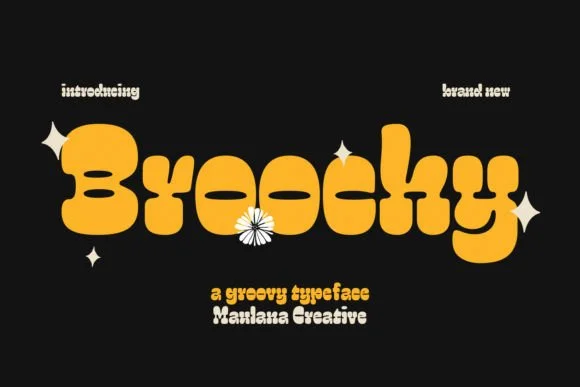
Broochy by Maulana Creative is a substantial slab serif display typeface that channels authentic 1970s design sensibility. Its thick letterforms and rounded serifs bring the distinct confidence and warmth of that era directly to contemporary projects, giving them genuine character without sacrificing refinement. The generous weight and bold presence make it a natural choice for headlines, logos, and any display work where visual personality needs to shine through.
This typeface finds its groove across a range of applications where retro appeal matters. Vintage diner menus with period-correct typography, vinyl record sleeve designs, and mod-inspired beauty brand packaging all benefit from Broochy's particular blend of strength and warmth. Retro shop signage that stops people mid-street, designer business cards with old-school charm, concert posters with disco-era vibes, these are the spaces where Broochy truly excels. The rounded serifs soften what could otherwise feel like a heavy, imposing typeface, while the chunky backbone actually maintains that distinctive confidence and charm. You get real weight without any visual heaviness, boldness that somehow still remains approachable.
Broochy rewards thoughtful use in display contexts where you want both impact and refinement. If you're after a display typeface that brings 70s soul to your design work, grab it from Creative Fabrica.
Style & Use Cases
- Overall Style
- Sturdy, Confident, Decorative
- Use Case
- Headlines, Merch
- Ideal For
- vintage posters, logos, and product packaging
- Pairs With
- a light sans-serif
How to Install Broochy Font
Step-by-step instructions for every platform
- 1Download the Broochy font file (.ttf or .otf).
- 2Locate the downloaded file in your Downloads folder.
- 3Right-click the font file.
- 4Select "Install" to install for the current user, or "Install for all users" to make it available system-wide.
- 5Broochy is now available in Word, Photoshop, Illustrator, and all other apps.
More by Maulana Creative
View all →
Browse fonts by theme
Curated collections →Saw a font in a picture? Identify any font from an image with our free Font Finder.
More Slab Serif Fonts
Browse all →







What pairs well with Broochy Font?
Broochy Font is a slab serif font that shines as a display or heading face. Pair it with a clean sans-serif or serif font for body text — the contrast creates a clear hierarchy while the two styles stay balanced and easy to read.




Broochy Font
Reviewed by the FontBoxDL team · Updated September 2026