 Firefox
 1 / 7
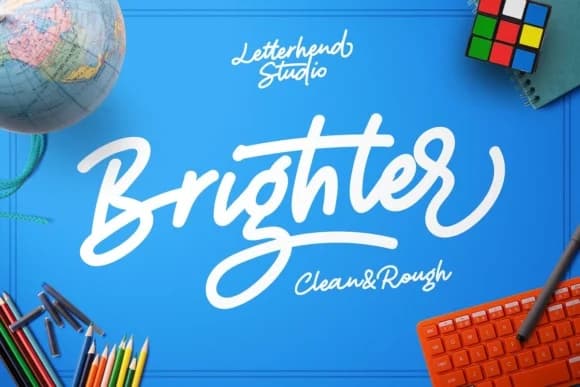
1 / 7About Brighter Script Font
Brighter Script Font by letterhend is a bold, casual script designed for work that refuses to blend in. This typeface captures the spontaneous energy of hand-lettering while maintaining the clarity and precision needed for both digital and print applications. With two distinctly different versions, a refined regular style and an edgier rough variant, this font provides the flexibility to adapt your creative vision across multiple project types and contexts. This script truly shines in wedding invitation suites where contemporary couples want to express both elegance and genuine warmth without relying on traditional calligraphy. It performs equally well for hand-lettered greeting cards designed to feel personal and authentic, personalized gift packaging that catches eyes on shelves, and branding work for indie makers building distinctive visual identities. The availability of both clean and textured versions makes it particularly effective for social media graphics that need to command attention while remaining readable at smaller sizes, or for storefront signage where character and legibility matter equally. Whether you're creating intimate stationery pieces, designing logos with personality, or developing a complete visual system for a small creative business, Brighter Script's casual confidence brings human warmth to your work. Explore this versatile typeface and see how it can transform your next project on Creative Fabrica.
Style & Use Cases
- Overall Style
- Elegant, Flowing, Brighter
- Use Case
- Invitations, Branding
- Ideal For
- wedding stationery, greeting cards, and signatures
- Pairs With
- a simple uppercase sans
How to Install Brighter Script Font Font
Step-by-step instructions for every platform
- 1Download the Brighter Script Font font file (.ttf or .otf).
- 2Locate the downloaded file in your Downloads folder.
- 3Right-click the font file.
- 4Select "Install" to install for the current user, or "Install for all users" to make it available system-wide.
- 5Brighter Script Font is now available in Word, Photoshop, Illustrator, and all other apps.
More by letterhend
View all →
Browse fonts by theme
Curated collections →Saw a font in a picture? Identify any font from an image with our free Font Finder.
More Script Handwritten Fonts
Browse all →







What pairs well with Brighter Script Font?
Brighter Script Font is a script font that shines as a display or heading face. Pair it with a clean sans-serif or serif font for body text — the contrast creates a clear hierarchy while the two styles stay balanced and easy to read.



Brighter Script Font
by letterhend
Reviewed by the FontBoxDL team · Updated May 2026