 Firefox
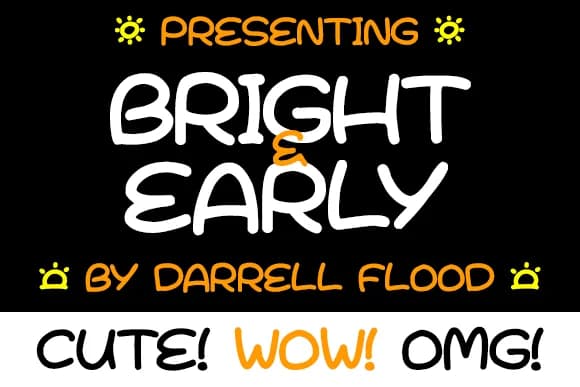
About Bright & Early Font
Bright & Early Font by Dadiomouse is a friendly hand-drawn typeface rendered in a felt tip marker style that brings warmth and authentic personality to contemporary designs. The playful character of this script makes it an excellent choice for projects that celebrate joy, approachability, and genuine human connection, making it particularly suited for children's book illustration work where authenticity resonates with young readers and parents alike. The typeface's organic letterforms work beautifully for baby shower stationery and new arrival invitations, creating designs that feel personal and heartfelt rather than mass-produced. Beyond birth announcements, Bright & Early proves equally versatile for greeting cards aimed at young families, holiday gift tags with a handmade touch, and decorative applications like nursery room wall decals where soft, playful typography becomes part of the décor. Small business owners building their brand around playfulness and authenticity, from toy companies to children's clothing lines, will find this font invaluable for packaging design and product labeling. The typeface strikes a balance between legibility and personality, ensuring readability across various applications while maintaining the sketched, approachable charm that makes it distinctive. Whether you're designing digital mockups, print materials, or mixed-media projects, Bright & Early delivers consistent character and warmth. Get Bright & Early Font on Creative Fabrica to add this hand-drawn aesthetic to your next project.
Style & Use Cases
- Overall Style
- Elegant, Flowing, Bright And Early
- Use Case
- Invitations, Branding
- Ideal For
- wedding stationery, greeting cards, and signatures
- Pairs With
- a simple uppercase sans
How to Install Bright & Early Font Font
Step-by-step instructions for every platform
- 1Download the Bright & Early Font font file (.ttf or .otf).
- 2Locate the downloaded file in your Downloads folder.
- 3Right-click the font file.
- 4Select "Install" to install for the current user, or "Install for all users" to make it available system-wide.
- 5Bright & Early Font is now available in Word, Photoshop, Illustrator, and all other apps.
More by Dadiomouse
View all →

Browse fonts by theme
Curated collections →Saw a font in a picture? Identify any font from an image with our free Font Finder.
More Script Handwritten Fonts
Browse all →







What pairs well with Bright & Early Font?
Bright & Early Font is a script font that shines as a display or heading face. Pair it with a clean sans-serif or serif font for body text — the contrast creates a clear hierarchy while the two styles stay balanced and easy to read.



Bright & Early Font
by Dadiomouse
Reviewed by the FontBoxDL team · Updated May 2026