 Firefox
 1 / 5
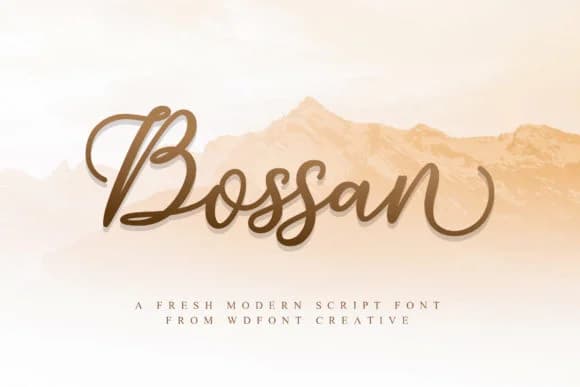
1 / 5About Bossan Font
Bossan by WDfont Creative is a contemporary handwritten script that balances casual charm with genuine usability. This typeface has the natural flow and clarity needed to work across different sizes, which matters when you're treating it as a primary font rather than occasional decoration. Unlike some heavily stylized scripts that prioritize aesthetic drama over function, Bossan holds its own at smaller sizes and maintains readability even when set as body text. The personal feel of the letterforms avoids becoming a legibility problem, which is harder to achieve than it sounds.
Wedding invitation suites are a natural home for this typeface, along with greeting cards and thank-you notes where you need handwriting's warmth without actual lettering work. Product packaging for artisanal goods and boutique brands works well too, especially when you want customers to feel the care behind your work. Bookmarks, gift tags, and stationery pick up that same energy. Beyond print, small business logos and social media graphics benefit from Bossan's balance of personality and clarity. Its versatility across sizes means you can set headlines in it alongside smaller type without losing the human touch that makes it compelling in the first place. Find Bossan on Creative Fabrica and bring this handwritten character to your next project.
Style & Use Cases
- Overall Style
- Elegant, Flowing, Bossan
- Use Case
- Invitations, Branding
- Ideal For
- wedding stationery, greeting cards, and signatures
- Pairs With
- a simple uppercase sans
How to Install Bossan Font Font
Step-by-step instructions for every platform
- 1Download the Bossan Font font file (.ttf or .otf).
- 2Locate the downloaded file in your Downloads folder.
- 3Right-click the font file.
- 4Select "Install" to install for the current user, or "Install for all users" to make it available system-wide.
- 5Bossan Font is now available in Word, Photoshop, Illustrator, and all other apps.
More by WDfont Creative
View all →
Browse fonts by theme
Curated collections →Saw a font in a picture? Identify any font from an image with our free Font Finder.
More Script Handwritten Fonts
Browse all →







What pairs well with Bossan Font?
Bossan Font is a script font that shines as a display or heading face. Pair it with a clean sans-serif or serif font for body text — the contrast creates a clear hierarchy while the two styles stay balanced and easy to read.



Bossan Font
Reviewed by the FontBoxDL team · Updated June 2026