 Firefox
 1 / 5
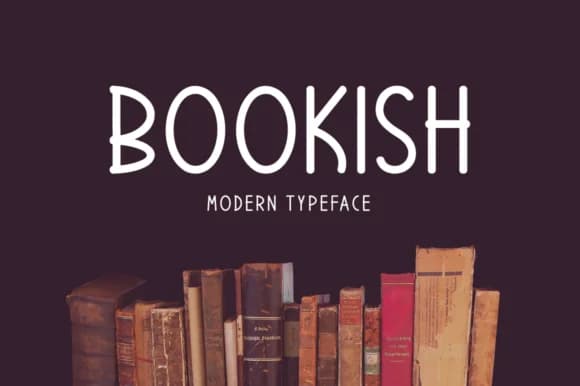
1 / 5About Bookish Font
This font carries the warmth of leafing through a well-loved literary collection, thoughtful and inviting without feeling contrived. Bookish, designed by Instagram Fonts, brings authentic handwritten character to modern designs while maintaining enough refinement for professional editorial work.
The real strength shows in specific applications: vintage book club invitations gain instant personality, poetry collection covers feel genuinely authorial, literary journal mastheads look appropriately curated, and antique-inspired library signage reads as authoritative without pretension. Beyond these editorial contexts, the script excels in smaller formats too. You might use it for custom bookmark sets, manuscript-style wedding programs, or even boutique bookstore window displays. The letters are detailed enough to work as a standalone display choice, yet remain legible if you're patient with spacing and kerning. That balance between visual interest and readability is what makes it work across so many formats without needing size adjustments.
Pair Bookish with a neutral serif or a clean sans-serif for body text to preserve reading comfort, then watch how the script brings personality to your headers and display work. The contrast between its flowing handwritten quality and structured typefaces creates visual depth without feeling mismatched. You'll find this font on Creative Fabrica, waiting to add genuine bookish charm to your next project.
Style & Use Cases
- Overall Style
- Elegant, Flowing, Bookish
- Use Case
- Invitations, Branding
- Ideal For
- wedding stationery, greeting cards, and signatures
- Pairs With
- a simple uppercase sans
How to Install Bookish Font Font
Step-by-step instructions for every platform
- 1Download the Bookish Font font file (.ttf or .otf).
- 2Locate the downloaded file in your Downloads folder.
- 3Right-click the font file.
- 4Select "Install" to install for the current user, or "Install for all users" to make it available system-wide.
- 5Bookish Font is now available in Word, Photoshop, Illustrator, and all other apps.
More by Instagram Fonts
View all →
Browse fonts by theme
Curated collections →Saw a font in a picture? Identify any font from an image with our free Font Finder.
More Script Handwritten Fonts
Browse all →







What pairs well with Bookish Font?
Bookish Font is a script font that shines as a display or heading face. Pair it with a clean sans-serif or serif font for body text — the contrast creates a clear hierarchy while the two styles stay balanced and easy to read.



Bookish Font
Reviewed by the FontBoxDL team · Updated August 2026