 Firefox
 1 / 5
1 / 5About Boogiescript Font
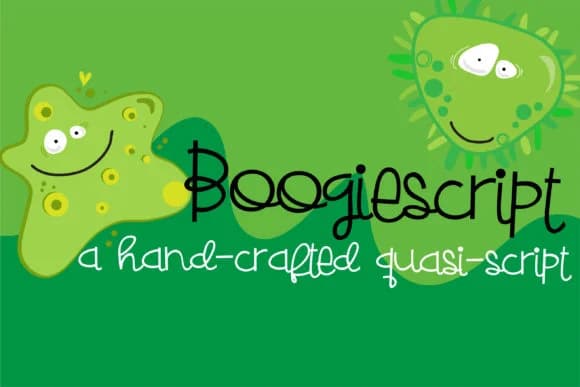
There's genuine charm in Boogiescript Font by Illustration Ink, a hand-drawn script that balances whimsy with structure. The font's upright letterforms have a casual, artisanal feel, as if sketched by hand with care and intention. Instead of flowing smoothly like traditional scripts, each character stands with a deliberate stiffness that makes it feel personal and authentic, rather than polished or precious. That quality is what draws designers back to it repeatedly.
This font excels at hand-lettered greeting card designs, particularly for birthday and congratulatory cards where personality matters most. It works equally well for DIY baby announcement cards, vinyl decal projects, and rustic craft labels on homemade jams, candles, or artisan goods. Scrapbooking layouts gain warmth from its informal letterforms, and the slightly stiff structure reinforces the handmade quality that makes these projects feel special and individual. Web designers sometimes use it for hero headlines on boutique retail sites, where a touch of human-made character strengthens brand identity and builds trust.
Pair Boogiescript with a clean, neutral sans-serif like Montserrat or Lato for layouts needing readability alongside personality and visual interest. Its sister font, ZP Boogieman, provides another stylistic direction if you want to layer different moods across a single project. Grab it from Creative Fabrica to add authentic handcrafted character to your next design.
Style & Use Cases
- Overall Style
- Elegant, Flowing, Boogiescript
- Use Case
- Invitations, Branding
- Ideal For
- wedding stationery, greeting cards, and signatures
- Pairs With
- a simple uppercase sans
How to Install Boogiescript Font Font
Step-by-step instructions for every platform
- 1Download the Boogiescript Font font file (.ttf or .otf).
- 2Locate the downloaded file in your Downloads folder.
- 3Right-click the font file.
- 4Select "Install" to install for the current user, or "Install for all users" to make it available system-wide.
- 5Boogiescript Font is now available in Word, Photoshop, Illustrator, and all other apps.
More by Illustration Ink
View all →



Browse fonts by theme
Curated collections →Saw a font in a picture? Identify any font from an image with our free Font Finder.
More Script Handwritten Fonts
Browse all →







What pairs well with Boogiescript Font?
Boogiescript Font is a script font that shines as a display or heading face. Pair it with a clean sans-serif or serif font for body text — the contrast creates a clear hierarchy while the two styles stay balanced and easy to read.



Boogiescript Font
Reviewed by the FontBoxDL team · Updated May 2026