 Firefox
 1 / 6
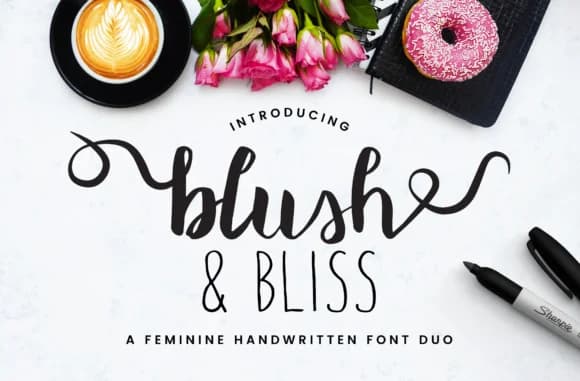
1 / 6About Blush & Bliss Font
Blush & Bliss by Christine Teixeira is a feminine handwritten duo pairing a flowing brush script with a compact all caps sans serif that brings warmth and personality to creative projects. This two-font system works beautifully for wedding invitation suites and formal event stationery, where the script delivers elegant display text while the sans serif anchors refined accents and information hierarchy. The same balance translates well to product packaging for indie beauty brands and DIY craft signage, where hand-drawn character meets the need for consistent readability across applications.
The brush script captures organic, hand-drawn movement with natural stroke variation, while the paired sans serif introduces geometric structure and contemporary visual contrast for functional emphasis. Together, they're effective for boutique skincare packaging labels, lifestyle brand stationery systems, seasonal greeting card designs, and handmade product projects that benefit from both visual interest and structural clarity. The pairing works across digital and print mediums, making it suitable for social media graphics, website headers, packaging design, and other applications where warmth and sophistication need to balance. Whether you need decorative script elements or clean sans serif accents, this complementary duo lets you establish distinct design layers and hierarchy throughout your work.
Get Blush & Bliss on Creative Fabrica and start using this versatile handwritten font duo in your next creative project.
Style & Use Cases
- Overall Style
- Elegant, Flowing, Blush
- Use Case
- Invitations, Branding
- Ideal For
- wedding stationery, greeting cards, and signatures
- Pairs With
- a simple uppercase sans
How to Install Blush & Bliss Font Font
Step-by-step instructions for every platform
- 1Download the Blush & Bliss Font font file (.ttf or .otf).
- 2Locate the downloaded file in your Downloads folder.
- 3Right-click the font file.
- 4Select "Install" to install for the current user, or "Install for all users" to make it available system-wide.
- 5Blush & Bliss Font is now available in Word, Photoshop, Illustrator, and all other apps.
More by Christine Teixeira
View all →



Browse fonts by theme
Curated collections →Saw a font in a picture? Identify any font from an image with our free Font Finder.
More Script Handwritten Fonts
Browse all →







What pairs well with Blush & Bliss Font?
Blush & Bliss Font is a script font that shines as a display or heading face. Pair it with a clean sans-serif or serif font for body text — the contrast creates a clear hierarchy while the two styles stay balanced and easy to read.



Blush & Bliss Font
Reviewed by the FontBoxDL team · Updated May 2026