 Firefox
 1 / 9
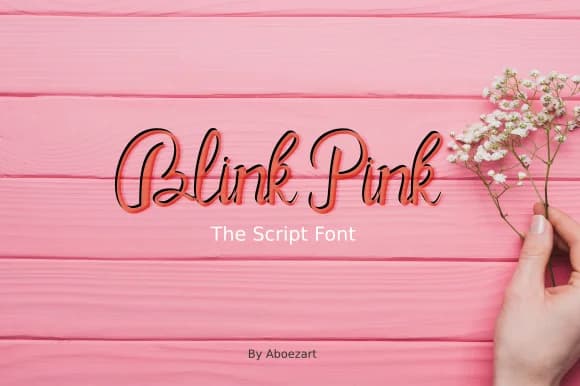
1 / 9About Blink Pink Font
This font captures a playful, contemporary energy that feels both fresh and warm. Blink Pink, designed by AboeZart Studio, is a handwritten script that brings genuine personality to work needing character without sacrificing polish.
The script works beautifully for wedding invitation suites where a modern, loose touch beats traditional calligraphy. It's equally strong on Etsy product labels that signal a handmade approach, boutique skincare packaging designed to stand out on crowded shelves, or DIY craft signage that looks purposeful rather than amateur. The letterforms flow naturally, giving text that personal touch while staying readable and intentional. You're not dealing with a font that sprawls or becomes precious. Instead, the letters maintain clarity even when the overall effect feels handwritten and organic. Its informal confidence works well for custom stationery, greeting cards, and any branding where warmth matters more than formality. Small business owners particularly appreciate it for projects that need to signal creativity without looking unprofessional.
Pair it with a clean, geometric sans-serif like Futura or DM Sans to ground longer passages and create visual breathing room. The contrast between the script's natural movement and a crisp typeface adds real depth to layouts. Get Blink Pink from Creative Fabrica and bring that handcrafted voice to your next design.
Style & Use Cases
- Overall Style
- Elegant, Flowing, Blink Pink
- Use Case
- Invitations, Branding
- Ideal For
- wedding stationery, greeting cards, and signatures
- Pairs With
- a simple uppercase sans
How to Install Blink Pink Font Font
Step-by-step instructions for every platform
- 1Download the Blink Pink Font font file (.ttf or .otf).
- 2Locate the downloaded file in your Downloads folder.
- 3Right-click the font file.
- 4Select "Install" to install for the current user, or "Install for all users" to make it available system-wide.
- 5Blink Pink Font is now available in Word, Photoshop, Illustrator, and all other apps.
More by AboeZart Studio
View all →

Browse fonts by theme
Curated collections →Saw a font in a picture? Identify any font from an image with our free Font Finder.
More Script Handwritten Fonts
Browse all →







What pairs well with Blink Pink Font?
Blink Pink Font is a script font that shines as a display or heading face. Pair it with a clean sans-serif or serif font for body text — the contrast creates a clear hierarchy while the two styles stay balanced and easy to read.



Blink Pink Font
Reviewed by the FontBoxDL team · Updated June 2026