
 1 / 8
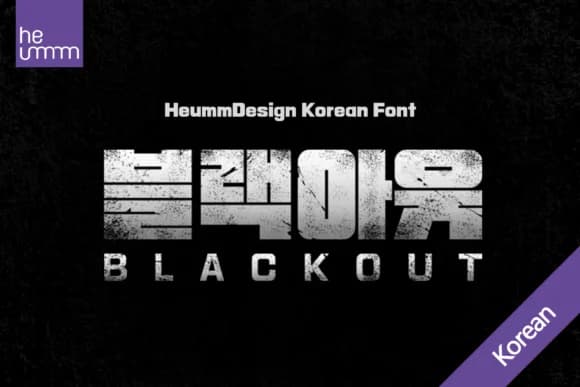
1 / 8About Blackout Kr Font
This typeface radiates a confident, almost confrontational boldness. Blackout Kr by heummdesign is a slab-serif display font engineered for commanding titles and headlines that won't fade into background noise. The letters sit as dense, geometric forms with compressed internal spacing, creating a visual weight that anchors any composition and demands immediate attention.
The three-weight family gives you flexibility to scale the design across different contexts without sacrificing the impact that makes this typeface distinctive. Use it for Korean cosmetics and skincare brand packaging that needs serious shelf presence, editorial mastheads in design-forward publications looking for something with real personality, poster work for art galleries and cultural institutions, or restaurant and bar signage where the typography carries the full weight of the brand message. Full Korean character support makes it equally strong for bilingual campaigns or any project targeting Korean-language audiences and markets.
Blackout Kr's density and geometric intensity can overwhelm a layout, which is precisely why pairing it with a refined, open sans-serif for body copy creates essential breathing room and visual contrast. This balance between weight and restraint lets your typography system work harder and feel more intentional overall. Find Blackout Kr on Creative Fabrica and bring this uncompromising presence to your next significant design project.
Style & Use Cases
- Overall Style
- Sturdy, Confident, Heumm
- Use Case
- Headlines, Merch
- Ideal For
- vintage posters, logos, and product packaging
- Pairs With
- a light sans-serif
How to Install Blackout Kr Font
Step-by-step instructions for every platform
- 1Download the Blackout Kr font file (.ttf or .otf).
- 2Locate the downloaded file in your Downloads folder.
- 3Right-click the font file.
- 4Select "Install" to install for the current user, or "Install for all users" to make it available system-wide.
- 5Blackout Kr is now available in Word, Photoshop, Illustrator, and all other apps.
More by heummdesign
View all →

Browse fonts by theme
Curated collections →Saw a font in a picture? Identify any font from an image with our free Font Finder.
More Slab Serif Fonts
Browse all →







What pairs well with Blackout Kr Font?
Blackout Kr Font is a slab serif font that shines as a display or heading face. Pair it with a clean sans-serif or serif font for body text — the contrast creates a clear hierarchy while the two styles stay balanced and easy to read.



Blackout Kr Font
by heummdesign
Reviewed by the FontBoxDL team · Updated August 2026