 Firefox
 1 / 9
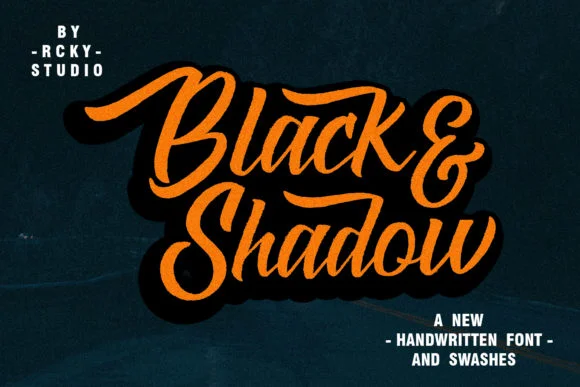
1 / 9About Black & Shadow Font
This font commands immediate attention with its striking layered, dimensional presence. Black & Shadow Font by rckystudio is a bold, exuberant handwritten script that bridges retro character with contemporary craft sensibility.
The core strength here is thick, confident strokes combined with integrated shadows, creating genuine visual depth without requiring extra layer work in your design software. It excels for vintage signage projects that truly demand personality, speakeasy and prohibition-era event posters with real attitude, retro greeting card designs that read as authentically handmade, and DIY vintage badge designs for packaging or decals. You'll find it equally effective in album artwork, heritage branding systems, and nostalgic product labels. The letterforms themselves carry real weight and confidence, bold and distinctive without veering into heavy-handed or awkward territory.
Multiple weights throughout the font family give you the genuine flexibility to emphasize headlines or dial back the intensity for secondary information. Pair Black & Shadow with a clean, modern sans-serif to create contrast and breathing room across your layouts. That push-pull between retro character and contemporary presentation keeps work feeling current rather than stuck in the past. Grab it from Creative Fabrica whenever you're hunting for type with genuine character, personality, impact, and real visual dimension.
Style & Use Cases
- Overall Style
- Elegant, Flowing, Black And Shadow
- Use Case
- Invitations, Branding
- Ideal For
- wedding stationery, greeting cards, and signatures
- Pairs With
- a simple uppercase sans
How to Install Black & Shadow Font Font
Step-by-step instructions for every platform
- 1Download the Black & Shadow Font font file (.ttf or .otf).
- 2Locate the downloaded file in your Downloads folder.
- 3Right-click the font file.
- 4Select "Install" to install for the current user, or "Install for all users" to make it available system-wide.
- 5Black & Shadow Font is now available in Word, Photoshop, Illustrator, and all other apps.
More by rckystudio
View all →
Browse fonts by theme
Curated collections →Saw a font in a picture? Identify any font from an image with our free Font Finder.
More Script Handwritten Fonts
Browse all →







What pairs well with Black & Shadow Font?
Black & Shadow Font is a script font that shines as a display or heading face. Pair it with a clean sans-serif or serif font for body text — the contrast creates a clear hierarchy while the two styles stay balanced and easy to read.




Black & Shadow Font
by rckystudio
Reviewed by the FontBoxDL team · Updated July 2026