 Firefox
 1 / 9
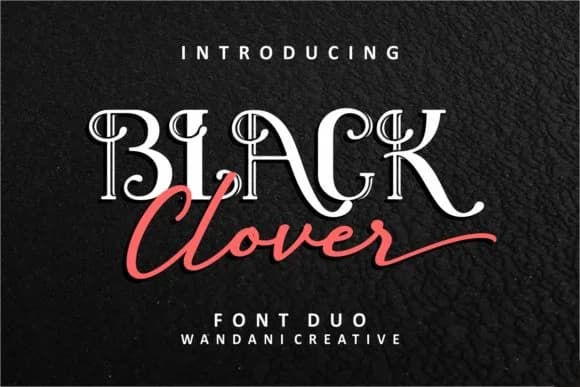
1 / 9About Black Clover Duo Font
Black Clover Duo by Beautypes is a modern vintage script pairing that blends hand-lettered warmth with contemporary flair. The duo includes both a flowing script version and a complementary display companion, giving you plenty of flexibility to apply them across different design applications. This dual approach works particularly well for wedding invitation suites where the flowing script handles the invitation copy while the display version anchors chapter headers, or for craft market brands on Etsy where both styles reinforce that vintage-contemporary look. The pairing also shines on boutique cosmetic packaging and personalized gift box labels where you need visual impact without feeling overly trendy or commercial.
What makes this duo particularly practical is how its modern vintage sensibility walks that tricky line between nostalgic and current. You can apply both versions to vinyl decal designs, band merchandise, or podcast cover artwork where authenticity really matters. The script carries all the personality while the display variant keeps everything legible and polished. If you're working on projects that need that distinctly vintage-leaning handmade feel without looking dated or gimmicky, this font delivers on both fronts. Pick up Black Clover Duo on Creative Fabrica and start using it in your next design project.
Style & Use Cases
- Overall Style
- Elegant, Flowing, Black Clover Script
- Use Case
- Invitations, Branding
- Ideal For
- wedding stationery, greeting cards, and signatures
- Pairs With
- a simple uppercase sans
How to Install Black Clover Duo Font Font
Step-by-step instructions for every platform
- 1Download the Black Clover Duo Font font file (.ttf or .otf).
- 2Locate the downloaded file in your Downloads folder.
- 3Right-click the font file.
- 4Select "Install" to install for the current user, or "Install for all users" to make it available system-wide.
- 5Black Clover Duo Font is now available in Word, Photoshop, Illustrator, and all other apps.
More by Beautypes
View all →


Browse fonts by theme
Curated collections →Saw a font in a picture? Identify any font from an image with our free Font Finder.
More Script Handwritten Fonts
Browse all →







What pairs well with Black Clover Duo Font?
Black Clover Duo Font is a script font that shines as a display or heading face. Pair it with a clean sans-serif or serif font for body text — the contrast creates a clear hierarchy while the two styles stay balanced and easy to read.



Black Clover Duo Font
by Beautypes
Reviewed by the FontBoxDL team · Updated June 2026