 Firefox
 1 / 5
1 / 5About Bestar Font
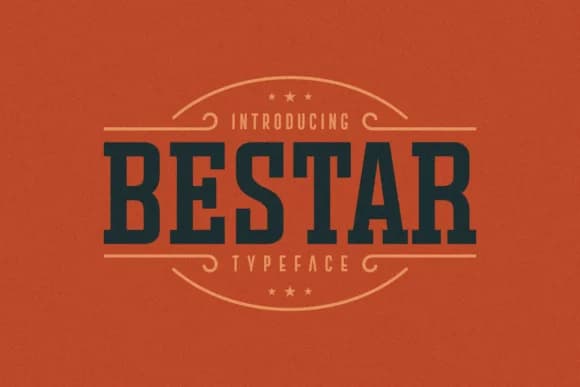
Warm, confident, and grounded in print history. Bestar is a slab serif display font by designer Situjuh that merges vintage character with contemporary vibrancy. The sturdy, geometric serifs give it a presence that feels both authoritative and inviting, making it an excellent choice for craft brewery labels, heritage restaurant menus, and indie music album artwork. Vintage-inspired wedding invitations also feel at home in this typeface, as do bookstore window displays, retro cosmetics packaging, and speakeasy design work. What sets Bestar apart from run-of-the-mill retro displays is how it avoids feeling dated or one-dimensional. It reads as nostalgic in voice but thoroughly current in application, suitable for both historical branding and modern projects that want a nod to the past.
The font's weight and balanced structure make it perform exceptionally well in headlines and large display sizes, though it maintains legibility when scaled down for smaller applications. Its strong personality means that pairing it with a clean, understated sans-serif for body text creates dynamic visual contrast without sacrificing readability. Print and digital projects both benefit from this combination, giving you flexibility across formats and mediums. Find Bestar on Creative Fabrica and add it to your collection for those moments when your design needs real character alongside polish.
Style & Use Cases
- Overall Style
- Sturdy, Confident
- Use Case
- Headlines, Merch
- Ideal For
- vintage posters, logos, and product packaging
- Pairs With
- a light sans-serif
How to Install Bestar Font
Step-by-step instructions for every platform
- 1Download the Bestar font file (.ttf or .otf).
- 2Locate the downloaded file in your Downloads folder.
- 3Right-click the font file.
- 4Select "Install" to install for the current user, or "Install for all users" to make it available system-wide.
- 5Bestar is now available in Word, Photoshop, Illustrator, and all other apps.

Browse fonts by theme
Curated collections →Saw a font in a picture? Identify any font from an image with our free Font Finder.
More Slab Serif Fonts
Browse all →







What pairs well with Bestar Font?
Bestar Font is a slab serif font that shines as a display or heading face. Pair it with a clean sans-serif or serif font for body text — the contrast creates a clear hierarchy while the two styles stay balanced and easy to read.



Bestar Font
by Situjuh
Reviewed by the FontBoxDL team · Updated August 2026