 Firefox
 1 / 7
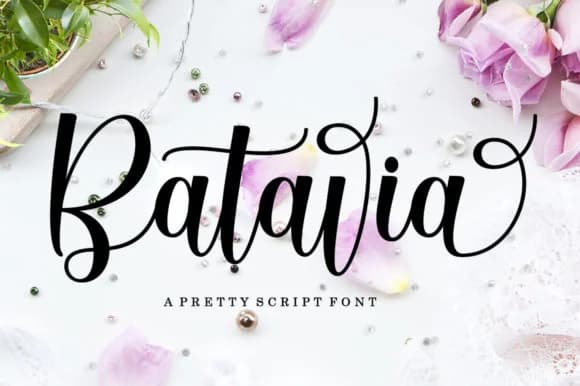
1 / 7About Batavia Script Font
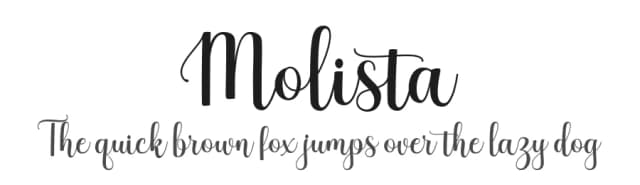
The letterforms in Batavia Script curve with a modern hand-drawn quality that catches light and air without feeling overly ornate. Created by LetterFreshStudio, this calligraphic typeface brings the fluidity of traditional pen work into a contemporary visual language, with flowing flourishes that extend naturally from the baseline and create real momentum across the page.
The script excels across a range of upscale applications: luxury wedding invitation suites, high-end cosmetics and skincare packaging, artisanal coffee shop signage, and personalized greeting cards where elegance is non-negotiable. Its balanced stroke width maintains readability even when sized down, making it equally effective for digital contexts like Instagram caption graphics, brand headers, and boutique Etsy product listings. The swash variations built into the design give you real flexibility in how much visual flourish you want: from formal event programs to more personality-driven work. That built-in control means you're not locked into one mood across all your applications.
This is the font for designers and creatives working on projects where that handmade, refined sensibility needs to shine through without feeling amateurish. Get it from Creative Fabrica and bring a sophisticated calligraphic voice to your next project.
Style & Use Cases
- Overall Style
- Elegant, Flowing, Batavia
- Use Case
- Invitations, Branding
- Ideal For
- wedding stationery, greeting cards, and signatures
- Pairs With
- a simple uppercase sans
How to Install Batavia Script Font Font
Step-by-step instructions for every platform
- 1Download the Batavia Script Font font file (.ttf or .otf).
- 2Locate the downloaded file in your Downloads folder.
- 3Right-click the font file.
- 4Select "Install" to install for the current user, or "Install for all users" to make it available system-wide.
- 5Batavia Script Font is now available in Word, Photoshop, Illustrator, and all other apps.
More by LetterFreshStudio
View all →
Browse fonts by theme
Curated collections →Saw a font in a picture? Identify any font from an image with our free Font Finder.
More Script Handwritten Fonts
Browse all →







What pairs well with Batavia Script Font?
Batavia Script Font is a script font that shines as a display or heading face. Pair it with a clean sans-serif or serif font for body text — the contrast creates a clear hierarchy while the two styles stay balanced and easy to read.



Batavia Script Font
Reviewed by the FontBoxDL team · Updated June 2026