 Firefox
 1 / 6
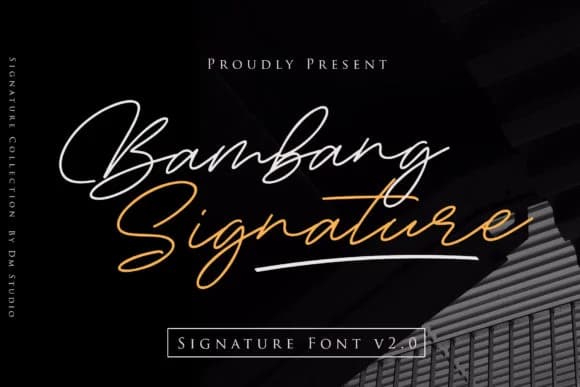
1 / 6About Bambang Signature Font
This font moves with the grace of genuine penmanship, bringing warmth to designs that simply need a human touch. Bambang Signature by dmletter31 is a handwritten script that preserves the fluidity of natural handwriting while maintaining enough refinement for professional applications.
The included swash alternates make each project feel personalized and intentional. Picture wedding invitation suites where names flow individually, luxury cosmetics branding that whispers "handcrafted" before anyone opens the box, high-end greeting card designs that announce occasion with restraint, and personalized stationery collections that make someone want to keep the card. This script shines on boutique skincare packaging labels where authenticity matters more than novelty, and it's equally at home addressing envelopes or anchoring a small-press literary journal cover. The balance it strikes is the real strength: organic enough to feel like an actual hand wrote it, controlled enough that every letter is legible and intentional.
Pair this with a light, geometric sans-serif for any supporting body copy, letting the handwritten script carry all the visual personality. The contrast will strengthen both faces. Grab Bambang Signature on Creative Fabrica and put it to work.
Style & Use Cases
- Overall Style
- Elegant, Flowing, Bambang Signature Vol 20
- Use Case
- Invitations, Branding
- Ideal For
- wedding stationery, greeting cards, and signatures
- Pairs With
- a simple uppercase sans
How to Install Bambang Signature Font Font
Step-by-step instructions for every platform
- 1Download the Bambang Signature Font font file (.ttf or .otf).
- 2Locate the downloaded file in your Downloads folder.
- 3Right-click the font file.
- 4Select "Install" to install for the current user, or "Install for all users" to make it available system-wide.
- 5Bambang Signature Font is now available in Word, Photoshop, Illustrator, and all other apps.
More by dmletter31
View all →
Browse fonts by theme
Curated collections →Saw a font in a picture? Identify any font from an image with our free Font Finder.
More Script Handwritten Fonts
Browse all →







What pairs well with Bambang Signature Font?
Bambang Signature Font is a script font that shines as a display or heading face. Pair it with a clean sans-serif or serif font for body text — the contrast creates a clear hierarchy while the two styles stay balanced and easy to read.



Bambang Signature Font
by dmletter31
Reviewed by the FontBoxDL team · Updated August 2026