 Firefox
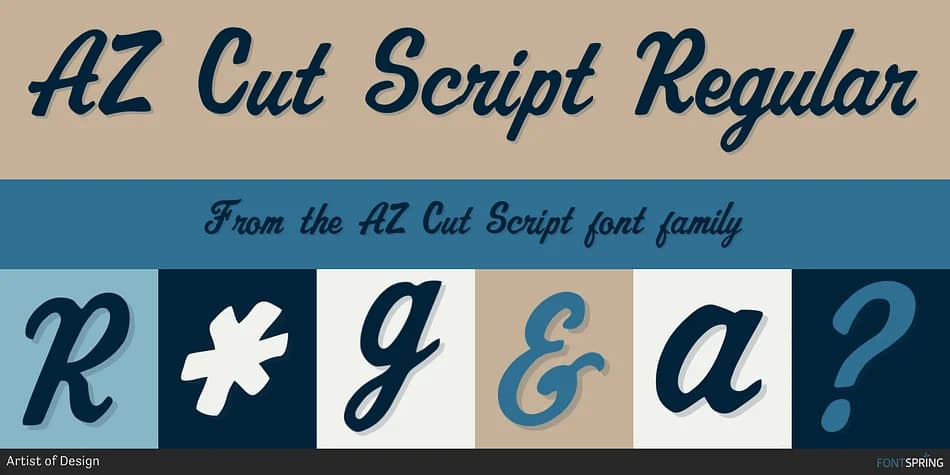
About AZ Cut Script Font
AZ Cut Script carries a hand-drawn, deliberately imperfect quality that reads like vintage lettering from decades past. Designed by Artist of Design, this script captures the character of lettering that's been living on signs and labels for years, slowly picking up wear and developing a genuine patina that feels earned rather than applied. There's an honesty in the wobbles and irregular line weights that make each letter feel genuinely handcrafted.
The worn edges and organic line work deliver authentic vintage presence without tipping into the retro-irony that plagues so many distressed fonts today. Each letter shows the slight irregularities of something drawn by hand, not generated by algorithm. This makes it a natural choice for vintage product packaging, rustic wedding invitation suites, nostalgic event posters, and custom apparel designs that actually need that genuinely lived-in aesthetic. Strip away anything overly designed and let the letterforms carry the weight themselves.
Use this font when setting headlines or prominent display text where character and personality need to do the heavy lifting. The letterforms are strong enough on their own that they don't require a lot of supporting design flourishes to work effectively. Find it on Creative Fabrica and bring that vintage character to your next project.
Style & Use Cases
- Overall Style
- Elegant, Flowing
- Use Case
- Invitations, Branding
- Ideal For
- wedding stationery, greeting cards, and signatures
- Pairs With
- a simple uppercase sans
How to Install AZ Cut Script Font
Step-by-step instructions for every platform
- 1Download the AZ Cut Script font file (.ttf or .otf).
- 2Locate the downloaded file in your Downloads folder.
- 3Right-click the font file.
- 4Select "Install" to install for the current user, or "Install for all users" to make it available system-wide.
- 5AZ Cut Script is now available in Word, Photoshop, Illustrator, and all other apps.
More by Artist of Design
View all →
Browse fonts by theme
Curated collections →Saw a font in a picture? Identify any font from an image with our free Font Finder.
More Script Handwritten Fonts
Browse all →







What pairs well with AZ Cut Script Font?
AZ Cut Script Font is a script font that shines as a display or heading face. Pair it with a clean sans-serif or serif font for body text — the contrast creates a clear hierarchy while the two styles stay balanced and easy to read.



AZ Cut Script Font
Reviewed by the FontBoxDL team · Updated July 2026