 Firefox
 1 / 9
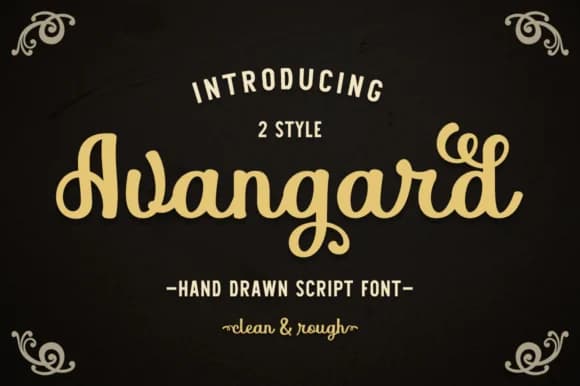
1 / 9About Avangard Font
Pasha Larin's Avangard Font captures a handwritten quality with organic letterforms that feel genuinely personal, not sterile or clinical. The script shows real character through its intentional imperfections, creating work that reads as crafted by actual hands rather than generated by algorithm. This rough-edged aesthetic brings authentic warmth to any project where handmade values and human touch matter more than flawless polish.
The vintage sensibility and honest letterforms make this script work beautifully for wedding invitation suites, where couples want their stationery to feel intimate and artisan-made. Small-batch product labels for handmade soap, boutique packaging, merchandise tags, and vintage-inspired branding all gain genuine depth from Avangard's texture and personality. Equally at home in greeting card designs, event posters, DIY craft signage, and artist portfolios, this font delivers the handcrafted feel contemporary makers and their audiences increasingly seek and value.
Designers and makers building brands around authenticity will find Avangard invaluable for creating hand-lettered menus, scrapbook layouts, and nostalgia-driven merchandise. It delivers exactly the personal touch clients are asking for, adding genuine warmth and human character to every project. Find it on Creative Fabrica, ready to bring handcrafted charm and personality to your next design work.
Style & Use Cases
- Overall Style
- Elegant, Flowing, Avangard
- Use Case
- Invitations, Branding
- Ideal For
- wedding stationery, greeting cards, and signatures
- Pairs With
- a simple uppercase sans
How to Install Avangard Font Font
Step-by-step instructions for every platform
- 1Download the Avangard Font font file (.ttf or .otf).
- 2Locate the downloaded file in your Downloads folder.
- 3Right-click the font file.
- 4Select "Install" to install for the current user, or "Install for all users" to make it available system-wide.
- 5Avangard Font is now available in Word, Photoshop, Illustrator, and all other apps.
More by Pasha Larin
View all →
Browse fonts by theme
Curated collections →Saw a font in a picture? Identify any font from an image with our free Font Finder.
More Script Handwritten Fonts
Browse all →







What pairs well with Avangard Font?
Avangard Font is a script font that shines as a display or heading face. Pair it with a clean sans-serif or serif font for body text — the contrast creates a clear hierarchy while the two styles stay balanced and easy to read.



Avangard Font
by Pasha Larin
Reviewed by the FontBoxDL team · Updated August 2026