 Firefox
 1 / 10
About Atlasbali Font
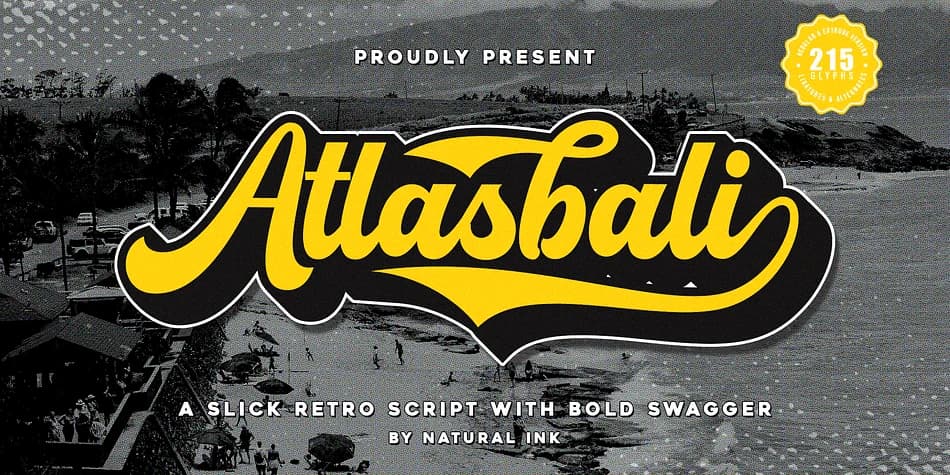
Nostalgic charm meets modern playfulness in this retro script. Atlasbali, designed by Natural Ink, brings that warm mid-century energy with an approachable character that works across diverse design contexts and applications.
The real strength is in how extensively it's built. Natural Ink packed comprehensive glyph sets alongside a built-in extrude feature that lets you add depth with shadows or layered effects straight from the regular version. You get full uppercase and lowercase letters, numerals, punctuation, and multilingual accent support that work across Adobe Suite, Silhouette Studio, and every other design software worth using. The files come in both OTF and TTF formats for maximum compatibility and flexibility.
This typeface hits its stride on vintage branding suites, wedding invitation stationery, handmade product labels, and custom sticker designs that demand personality. The retro warmth equally suits boutique packaging and DIY craft signage where character matters as much as readability. When you're building layouts with this as the visual anchor, pair it with a clean, geometric sans-serif to handle body copy and create necessary breathing room. Find Atlasbali on Creative Fabrica and add it to your collection.
Style & Use Cases
- Overall Style
- Elegant, Flowing
- Use Case
- Invitations, Branding
- Ideal For
- wedding stationery, greeting cards, and signatures
- Pairs With
- a simple uppercase sans
How to Install Atlasbali Font
Step-by-step instructions for every platform
- 1Download the Atlasbali font file (.ttf or .otf).
- 2Locate the downloaded file in your Downloads folder.
- 3Right-click the font file.
- 4Select "Install" to install for the current user, or "Install for all users" to make it available system-wide.
- 5Atlasbali is now available in Word, Photoshop, Illustrator, and all other apps.
More by Natural Ink
View all →

Browse fonts by theme
Curated collections →Saw a font in a picture? Identify any font from an image with our free Font Finder.
More Script Handwritten Fonts
Browse all →







What pairs well with Atlasbali Font?
Atlasbali Font is a script font that shines as a display or heading face. Pair it with a clean sans-serif or serif font for body text — the contrast creates a clear hierarchy while the two styles stay balanced and easy to read.



Atlasbali Font
by Natural Ink
Reviewed by the FontBoxDL team · Updated July 2026