 Firefox
 1 / 9
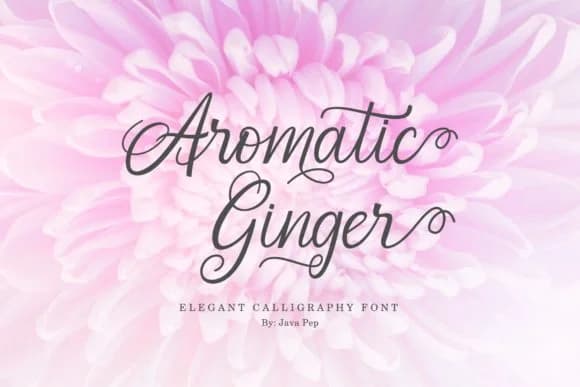
1 / 9About Aromatic Ginger Font
The brushlike strokes and variable line weight of Aromatic Ginger Font, created by JavaPep, capture the authentic character of dip pen calligraphy without requiring the weeks of practice those letterforms traditionally demand. Each character flows with a natural irregularity that reads as genuinely hand-drawn, bringing real warmth and personality to any layout that needs a more human, less corporate voice. The imperfection is the point: it's what makes the font feel alive and intentional rather than templated.
This script works beautifully across a wide range of projects. Wedding invitation suites, from formal announcements to thank-you cards, benefit from its balanced elegance and genuine approachability. Boutique skincare brands and artisanal cosmetics companies gain instant credibility from its sophisticated yet unpretentious character. DIY craft signs, monogram designs, and menu cards for casual fine-dining restaurants each find a natural home here. The font also shines for small-batch food packaging and branding projects where you need to signal authentic craftsmanship, heritage, and careful attention to detail without appearing overly formal or stiff.
Aromatic Ginger is ideal for designers and makers who want calligraphic sophistication in their work without commissioning expensive custom lettering. Find it on Creative Fabrica and add it to your font collection.
Style & Use Cases
- Overall Style
- Elegant, Flowing, Aromatic Ginger
- Use Case
- Invitations, Branding
- Ideal For
- wedding stationery, greeting cards, and signatures
- Pairs With
- a simple uppercase sans
How to Install Aromatic Ginger Font Font
Step-by-step instructions for every platform
- 1Download the Aromatic Ginger Font font file (.ttf or .otf).
- 2Locate the downloaded file in your Downloads folder.
- 3Right-click the font file.
- 4Select "Install" to install for the current user, or "Install for all users" to make it available system-wide.
- 5Aromatic Ginger Font is now available in Word, Photoshop, Illustrator, and all other apps.

Browse fonts by theme
Curated collections →Saw a font in a picture? Identify any font from an image with our free Font Finder.
More Script Handwritten Fonts
Browse all →







What pairs well with Aromatic Ginger Font?
Aromatic Ginger Font is a script font that shines as a display or heading face. Pair it with a clean sans-serif or serif font for body text — the contrast creates a clear hierarchy while the two styles stay balanced and easy to read.



Aromatic Ginger Font
by JavaPep
Reviewed by the FontBoxDL team · Updated June 2026