 Firefox
 1 / 9
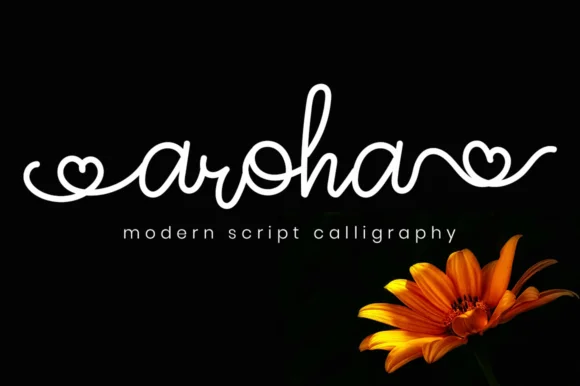
1 / 9About Aroha Script Font
Aroha Script has that personal, hand-lettered warmth that makes designs feel genuinely made, not mass-produced. Created by attypestudio, this handwritten script brings a relaxed confidence to any project it touches. There's something disarming about the way each character feels traced by a thoughtful hand rather than engineered by cold geometry. It reads effortless even when you know someone worked hard to get it exactly right.
The font excels at wedding invitation suites where formality needs to feel human and intimate. Greeting card designs get a real boost from its conversational quality and approachable rhythm. Use it for brand identity work on indie cosmetics, artisan food labels, and boutique packaging where personality trumps polish. Album covers benefit from its natural flow, as do DIY craft labels and custom social media graphics where you want something with genuine character. When you need a script that whispers instead of shouts, this one lands perfectly.
Pair Aroha Script with a clean, minimal sans-serif for body copy or supporting text to anchor the design. The contrast gives you warmth on top and clarity below, creating visual balance without competing elements. Find it on Creative Fabrica when you're ready to add it to your collection.
Style & Use Cases
- Overall Style
- Elegant, Flowing, Aroha
- Use Case
- Invitations, Branding
- Ideal For
- wedding stationery, greeting cards, and signatures
- Pairs With
- a simple uppercase sans
How to Install Aroha Script Font Font
Step-by-step instructions for every platform
- 1Download the Aroha Script Font font file (.ttf or .otf).
- 2Locate the downloaded file in your Downloads folder.
- 3Right-click the font file.
- 4Select "Install" to install for the current user, or "Install for all users" to make it available system-wide.
- 5Aroha Script Font is now available in Word, Photoshop, Illustrator, and all other apps.
More by attypestudio
View all →

Browse fonts by theme
Curated collections →Saw a font in a picture? Identify any font from an image with our free Font Finder.
More Script Handwritten Fonts
Browse all →







What pairs well with Aroha Script Font?
Aroha Script Font is a script font that shines as a display or heading face. Pair it with a clean sans-serif or serif font for body text — the contrast creates a clear hierarchy while the two styles stay balanced and easy to read.




Aroha Script Font
by attypestudio
Reviewed by the FontBoxDL team · Updated August 2026