 Firefox
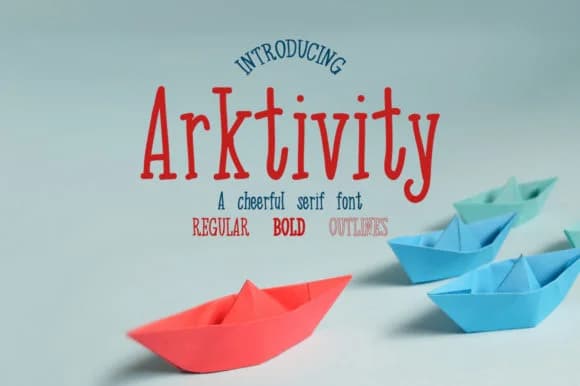 1 / 4
1 / 4About Arkitivity Font
Arkitivity brings back that organic warmth you feel when real pen hits paper. Twenty Two's design captures genuine pen strokes and natural rhythm in three styles: regular, bold, and outlined, so you get flexibility without losing the handmade quality that makes the font truly distinctive and memorable.
The letterforms work beautifully in any project demanding genuine personality and crafted detail. Wedding invitation suites showcase its elegance perfectly, as do hand-lettered product labels for artisanal skincare lines, specialty beverage packaging, and boutique cosmetics. Kraft-paper thank-you card sets gain immediate sophistication with Arkitivity, and calligraphy-style brand monograms look authentic rather than costume-y. Small publishers and designers rely on it for book cover lettering and chapter headers. Etsy sellers gravitate toward it for shop branding and product photography overlays, while freelance designers use it for custom website headers and branded social media graphics where authenticity and personality matter. Even restaurant menus and cafe signage benefit from its approachable formality.
Pair Arkitivity with a clean, minimal sans-serif for any supporting body text. That contrast makes both fonts more powerful and prevents designs from feeling cluttered or overwrought. You'll find Arkitivity waiting on Creative Fabrica, ready to become a reliable choice whenever your work calls for that handcrafted, genuine voice.
Style & Use Cases
- Overall Style
- Elegant, Flowing, Arkitivity Regular
- Use Case
- Invitations, Branding
- Ideal For
- wedding stationery, greeting cards, and signatures
- Pairs With
- a simple uppercase sans
How to Install Arkitivity Font Font
Step-by-step instructions for every platform
- 1Download the Arkitivity Font font file (.ttf or .otf).
- 2Locate the downloaded file in your Downloads folder.
- 3Right-click the font file.
- 4Select "Install" to install for the current user, or "Install for all users" to make it available system-wide.
- 5Arkitivity Font is now available in Word, Photoshop, Illustrator, and all other apps.
More by Twenty Two
View all →
Browse fonts by theme
Curated collections →Saw a font in a picture? Identify any font from an image with our free Font Finder.
More Script Handwritten Fonts
Browse all →







What pairs well with Arkitivity Font?
Arkitivity Font is a script font that shines as a display or heading face. Pair it with a clean sans-serif or serif font for body text — the contrast creates a clear hierarchy while the two styles stay balanced and easy to read.



Arkitivity Font
by Twenty Two
Reviewed by the FontBoxDL team · Updated May 2026