 Firefox
 1 / 5
1 / 5About Antonio Font
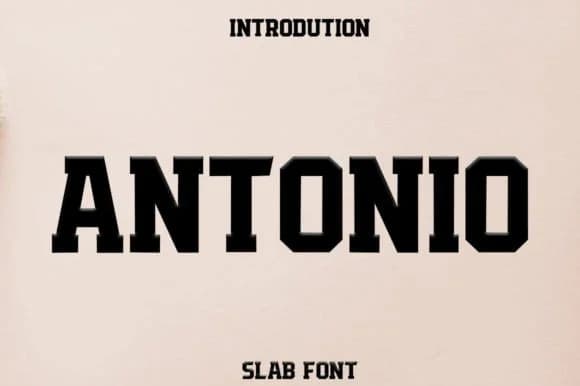
Antonio by Hendrik studio is a slab serif typeface built for serious visual impact. Unlike traditional serifs with tapered, refined strokes, Antonio's serifs are chunky and uniform, creating a bold visual weight that commands attention. This structured confidence makes it ideal for projects that need genuine personality without sacrificing readability or clarity.
The typeface excels at headline work across multiple contexts. Movie title sequences, contemporary book covers, and fashion brand lookbooks all benefit from its density and commanding presence. You'll find it equally effective on packaging for small-batch coffee roasters and handmade craft goods, on editorial spreads that demand visual authority, or applied to vintage-inspired posters and promotional materials. The geometric precision underlying its design means it maintains its character and impact across various sizes.
What sets Antonio apart is how the uniform slab structure creates visual rhythm while holding legibility intact. Album cover artwork, restaurant identity systems, and bold advertising campaigns all gain a contemporary edge from this typeface, one that feels both confident and genuinely approachable. The consistent serif weight gives it a modern yet grounded quality that works equally well across both digital and print applications.
Grab Antonio on Creative Fabrica and bring this distinctive slab serif into your next project.
Style & Use Cases
- Overall Style
- Sturdy, Confident, Design
- Use Case
- Headlines, Merch
- Ideal For
- vintage posters, logos, and product packaging
- Pairs With
- a light sans-serif
How to Install Antonio Font
Step-by-step instructions for every platform
- 1Download the Antonio font file (.ttf or .otf).
- 2Locate the downloaded file in your Downloads folder.
- 3Right-click the font file.
- 4Select "Install" to install for the current user, or "Install for all users" to make it available system-wide.
- 5Antonio is now available in Word, Photoshop, Illustrator, and all other apps.
More by Hendrik studio
View all →

Browse fonts by theme
Curated collections →Saw a font in a picture? Identify any font from an image with our free Font Finder.
More Slab Serif Fonts
Browse all →







What pairs well with Antonio Font?
Antonio Font is a slab serif font that shines as a display or heading face. Pair it with a clean sans-serif or serif font for body text — the contrast creates a clear hierarchy while the two styles stay balanced and easy to read.



Antonio Font
Reviewed by the FontBoxDL team · Updated September 2026