 Firefox
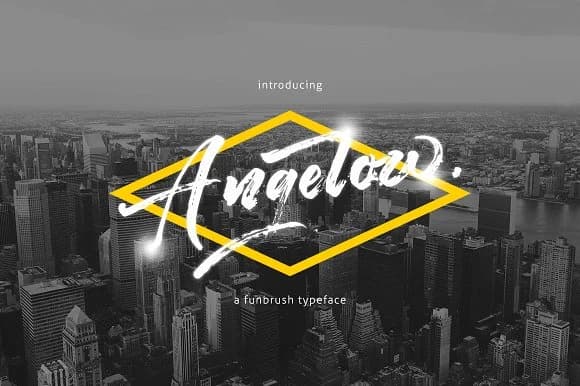 1 / 9
1 / 9About Angelow Font
Angelow by Thirtypath is a rough brush script that brings organic, hand-lettered character to any design project. The font's distinctive texture and intentional irregularities make it ideal for creating authentic brush lettering effects without requiring traditional calligraphy training or skills. Whether you're designing custom apparel graphics, building event merchandise branding, or crafting wedding invitation suites with character and personality, this typeface delivers the tactile quality of hand-painted lettering.
The rough brush texture works beautifully for boutique packaging design and personal stationery, lending warmth to luxury product labels and independent small business branding. It's equally effective for DIY craft signage, social media graphics that command attention, and hand-lettered poster design. The font captures that imperfect-but-intentional aesthetic that resonates across contemporary applications, from trendy cafe branding to artisan skincare packaging to independent bookshop signage.
Angelow adapts to both headline-driven layouts and shorter tagline applications, making it versatile across different design contexts and formats. If you're seeking a brush script that reads like genuine handwork rather than digital polish, this font delivers authentic character and lived-in warmth. Get Angelow Font from Creative Fabrica and start creating with brush lettering that feels genuinely handmade.
Style & Use Cases
- Overall Style
- Elegant, Flowing, Angelow
- Use Case
- Invitations, Branding
- Ideal For
- wedding stationery, greeting cards, and signatures
- Pairs With
- a simple uppercase sans
How to Install Angelow Font Font
Step-by-step instructions for every platform
- 1Download the Angelow Font font file (.ttf or .otf).
- 2Locate the downloaded file in your Downloads folder.
- 3Right-click the font file.
- 4Select "Install" to install for the current user, or "Install for all users" to make it available system-wide.
- 5Angelow Font is now available in Word, Photoshop, Illustrator, and all other apps.
More by Thirtypath
View all →
Browse fonts by theme
Curated collections →Saw a font in a picture? Identify any font from an image with our free Font Finder.
More Script Handwritten Fonts
Browse all →







What pairs well with Angelow Font?
Angelow Font is a script font that shines as a display or heading face. Pair it with a clean sans-serif or serif font for body text — the contrast creates a clear hierarchy while the two styles stay balanced and easy to read.



Angelow Font
by Thirtypath
Reviewed by the FontBoxDL team · Updated May 2026