 Firefox
 1 / 4
1 / 4About Angellida Font
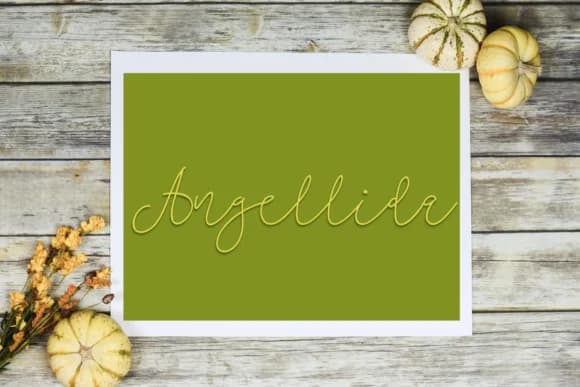
Angellida by Mozyen Studio combines confident curves with an elegant flow that feels equally at home in handwritten lettering and refined typography. The letterforms carry substantial weight without sacrificing readability, making this script remarkably adaptable to different design challenges and scales.
This font shines on wedding invitation suites where you want personality without compromising sophistication. Luxury beauty and skincare brands use it effectively for product packaging that feels both modern and handcrafted. Logo work for boutique shops, creative agencies, and high-end service providers benefit from its classy stroke construction. Photography overlays and social media headers gain instant polish and presence, while event invitations of all kinds read with authentic warmth rather than generic computer typefaces. Craft-oriented DIY sign designs also benefit from its elevated hand-lettered appeal.
The calligraphic foundation gives Angellida its distinctive character, while the consistent weight and construction keep it performing reliably across different point sizes and applications. Branding projects, event design work, and luxury product aesthetics all benefit from how this typeface handles everything from headlines to body text with equal grace. Designers seeking a script that balances refinement with personality will find it delivers on both fronts. Access Angellida through Creative Fabrica and discover its full potential for your next project.
Style & Use Cases
- Overall Style
- Elegant, Flowing, Branding
- Use Case
- Invitations, Branding
- Ideal For
- wedding stationery, greeting cards, and signatures
- Pairs With
- a simple uppercase sans
How to Install Angellida Font Font
Step-by-step instructions for every platform
- 1Download the Angellida Font font file (.ttf or .otf).
- 2Locate the downloaded file in your Downloads folder.
- 3Right-click the font file.
- 4Select "Install" to install for the current user, or "Install for all users" to make it available system-wide.
- 5Angellida Font is now available in Word, Photoshop, Illustrator, and all other apps.
More by Mozyen Studio
View all →
Browse fonts by theme
Curated collections →Saw a font in a picture? Identify any font from an image with our free Font Finder.
More Script Handwritten Fonts
Browse all →







What pairs well with Angellida Font?
Angellida Font is a script font that shines as a display or heading face. Pair it with a clean sans-serif or serif font for body text — the contrast creates a clear hierarchy while the two styles stay balanced and easy to read.



Angellida Font
Reviewed by the FontBoxDL team · Updated September 2026