 Firefox
 1 / 7
1 / 7About Andigo Font
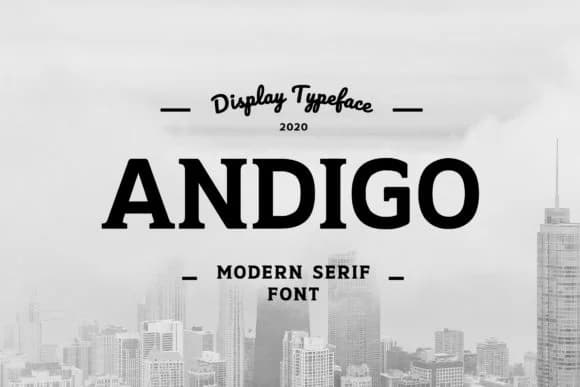
You're laying out a luxury brand identity system, and you need typography that lands with real authority. Andigo, crafted by uicreativenet, is the slab serif that does this work best. This display typeface brings structured impact wherever letterforms need to command attention: high-end product packaging, boutique cosmetics labels, real estate marketing collateral, and editorial banners that own the page. The font's bold weight carries presence without requiring extra visual effects to support it.
Slab serifs work best when they're doing something specific, and Andigo knows exactly what it does. It handles large sizes without feeling crude or overwrought, which matters for designs at scale. Magazine headers, book cover titles, logo lockups, and badge designs all benefit from that balance of contemporary sensibility with substantial weight. Capital letters naturally dominate, locking in with presence, while the structured serifs keep everything feeling intentional rather than merely decorative. You'll return to this font across multiple projects once you understand its range.
Its consistent stroke weight makes it equally at home in corporate identity systems or event signage applications where you need the font to read with confidence at any scale. Grab Andigo on Creative Fabrica and see how the typeface handles the work slab serifs do best.
Style & Use Cases
- Overall Style
- Sturdy, Confident, Display
- Use Case
- Headlines, Merch
- Ideal For
- vintage posters, logos, and product packaging
- Pairs With
- a light sans-serif
How to Install Andigo Font
Step-by-step instructions for every platform
- 1Download the Andigo font file (.ttf or .otf).
- 2Locate the downloaded file in your Downloads folder.
- 3Right-click the font file.
- 4Select "Install" to install for the current user, or "Install for all users" to make it available system-wide.
- 5Andigo is now available in Word, Photoshop, Illustrator, and all other apps.
More by uicreativenet
View all →

Browse fonts by theme
Curated collections →Saw a font in a picture? Identify any font from an image with our free Font Finder.
More Slab Serif Fonts
Browse all →







What pairs well with Andigo Font?
Andigo Font is a slab serif font that shines as a display or heading face. Pair it with a clean sans-serif or serif font for body text — the contrast creates a clear hierarchy while the two styles stay balanced and easy to read.



Andigo Font
Reviewed by the FontBoxDL team · Updated August 2026