 Firefox
 1 / 5
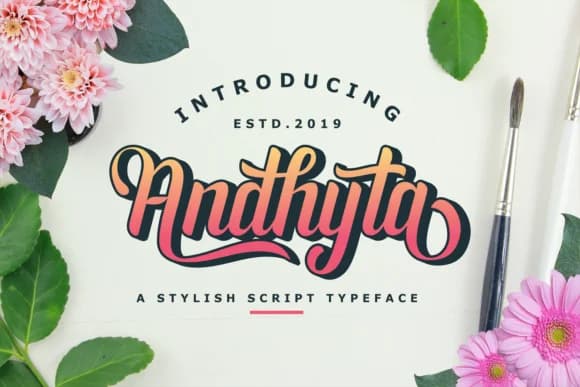
1 / 5About Andhyta Font
Picture yourself designing a wedding invitation suite or layering text across boutique product labels. Andhyta, designed by nurfdesigns, is a handwritten script that carries genuine personality without veering into overly cute territory. Confidence comes through even in its informal moments, making it work comfortably at any size.
Brush-like strokes give each letter a relaxed, drawn-by-hand quality that feels alive. Multiple ligatures knit letters together naturally, which means when you use it for logos, brand headers, or menu covers, the flow feels intentional rather than clunky. Restaurant signage, event stationery, and greeting cards all benefit from this sense of craft. Legibility stays strong across letterforms, whether you're setting it large for display or small for details.
Since Andhyta includes ligatures and alternates, you can tweak how words land on the page. One letter combination might flow one way, and swapping in an alternate changes the whole feel. Such flexibility means you're not locked into a single look, and each project can have its own handcrafted vibe. At larger sizes, the font reads cleanly without losing personality, making it especially strong for posters, packaging headers, or any design where presence matters. Find Andhyta on Creative Fabrica and add it to your library.
Style & Use Cases
- Overall Style
- Elegant, Flowing, Script Font
- Use Case
- Invitations, Branding
- Ideal For
- wedding stationery, greeting cards, and signatures
- Pairs With
- a simple uppercase sans
How to Install Andhyta Font Font
Step-by-step instructions for every platform
- 1Download the Andhyta Font font file (.ttf or .otf).
- 2Locate the downloaded file in your Downloads folder.
- 3Right-click the font file.
- 4Select "Install" to install for the current user, or "Install for all users" to make it available system-wide.
- 5Andhyta Font is now available in Word, Photoshop, Illustrator, and all other apps.
More by nurfdesigns
View all →
Browse fonts by theme
Curated collections →Saw a font in a picture? Identify any font from an image with our free Font Finder.
More Script Handwritten Fonts
Browse all →







What pairs well with Andhyta Font?
Andhyta Font is a script font that shines as a display or heading face. Pair it with a clean sans-serif or serif font for body text — the contrast creates a clear hierarchy while the two styles stay balanced and easy to read.



Andhyta Font
by nurfdesigns
Reviewed by the FontBoxDL team · Updated August 2026