 Firefox
 1 / 7
1 / 7About Andalusya Font
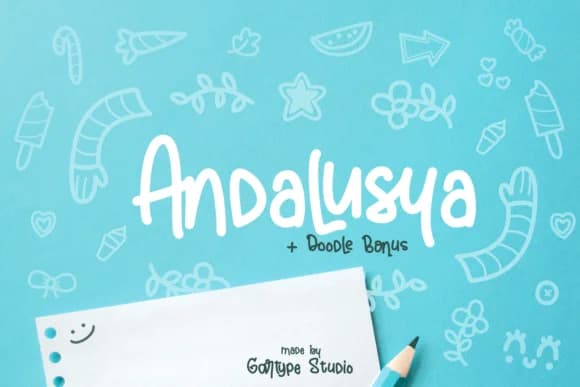
Andalusya by GartypeStudio is a flowing handwritten script with genuine character and polish. The letterforms carry a natural bounce and rhythm that brings life to designs without feeling chaotic or forced. This is the kind of typeface that works when you want personality but still need readability, a balance that many decorative scripts struggle to achieve. The handwritten quality feels authentic without looking sloppy or hard to manufacture at scale.
The script shines across several distinct applications. Wedding invitation suites benefit from its approachable elegance, where guests respond to the personal touch without straining to read the words. It's equally strong for Etsy product labels and custom packaging design, where the handwritten quality builds trust with craft buyers. Small businesses and cafes use Andalusya for hand-lettered signage that photographs well on social media. Even greeting card designs and social media graphics work nicely when you want a softer alternative to rigid sans-serifs. The font's warmth makes it a natural choice for anything targeting a personal or artisanal angle.
The font includes decorative doodles as bonus elements, so you have supporting ornaments ready to use. The letterforms maintain legibility at smaller sizes, which gives you more flexibility than many similar scripts. Grab Andalusya on Creative Fabrica and explore what it brings to your next project.
Style & Use Cases
- Overall Style
- Elegant, Flowing, Andalusya
- Use Case
- Invitations, Branding
- Ideal For
- wedding stationery, greeting cards, and signatures
- Pairs With
- a simple uppercase sans
How to Install Andalusya Font Font
Step-by-step instructions for every platform
- 1Download the Andalusya Font font file (.ttf or .otf).
- 2Locate the downloaded file in your Downloads folder.
- 3Right-click the font file.
- 4Select "Install" to install for the current user, or "Install for all users" to make it available system-wide.
- 5Andalusya Font is now available in Word, Photoshop, Illustrator, and all other apps.
More by GartypeStudio
View all →

Browse fonts by theme
Curated collections →Saw a font in a picture? Identify any font from an image with our free Font Finder.
More Script Handwritten Fonts
Browse all →







What pairs well with Andalusya Font?
Andalusya Font is a script font that shines as a display or heading face. Pair it with a clean sans-serif or serif font for body text — the contrast creates a clear hierarchy while the two styles stay balanced and easy to read.



Andalusya Font
Reviewed by the FontBoxDL team · Updated May 2026