 Firefox
 1 / 6
1 / 6About Alhenya Font
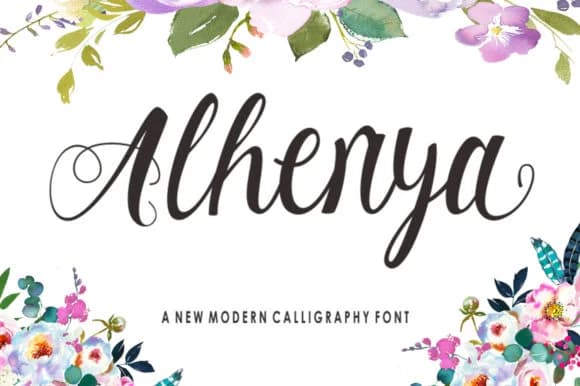
Alhenya by studioguntur is a modern script that sits between casual and polished, making it work across a wider range of projects than you might expect from a hand-drawn typeface. The real appeal here is versatility paired with restraint. Wedding invitation suites gain a contemporary feel with Alhenya, while luxury cosmetics branding finds the hand-drawn warmth it needs without veering into territory that feels too informal. High-end restaurant menus and social media graphics both benefit from this font's ability to carry your brand voice clearly without becoming overwrought or visually noisy.
The letterforms flow naturally without sacrificing legibility, which means you can use it at large display sizes without losing clarity or dial it back for smaller applications where subtlety and readability matter equally. What sets Alhenya apart is how it manages to feel both personal and professional in the same moment. This script doesn't whisper or shout. It speaks with clear intention. You can put it on boutique product packaging, use it for event signage, build it into a logo concept, or set your digital headlines with it and each application carries the same confident, unfussy character. Get Alhenya on Creative Fabrica and see how it transforms your next piece.
Style & Use Cases
- Overall Style
- Elegant, Flowing, Alhenya Script
- Use Case
- Invitations, Branding
- Ideal For
- wedding stationery, greeting cards, and signatures
- Pairs With
- a simple uppercase sans
How to Install Alhenya Font Font
Step-by-step instructions for every platform
- 1Download the Alhenya Font font file (.ttf or .otf).
- 2Locate the downloaded file in your Downloads folder.
- 3Right-click the font file.
- 4Select "Install" to install for the current user, or "Install for all users" to make it available system-wide.
- 5Alhenya Font is now available in Word, Photoshop, Illustrator, and all other apps.
More by studioguntur
View all →


Browse fonts by theme
Curated collections →Saw a font in a picture? Identify any font from an image with our free Font Finder.
More Script Handwritten Fonts
Browse all →







What pairs well with Alhenya Font?
Alhenya Font is a script font that shines as a display or heading face. Pair it with a clean sans-serif or serif font for body text — the contrast creates a clear hierarchy while the two styles stay balanced and easy to read.



Alhenya Font
by studioguntur
Reviewed by the FontBoxDL team · Updated June 2026