 Firefox
 1 / 9
1 / 9About Alessandria Font
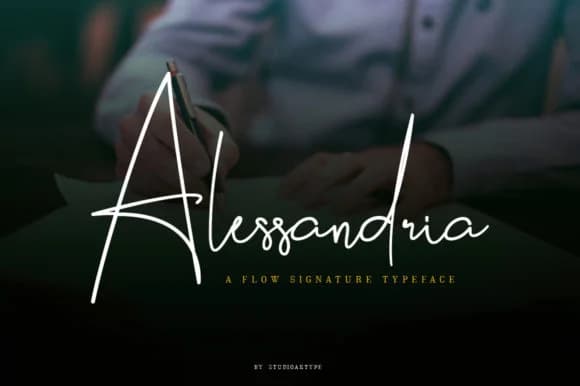
Alessandria by StudioAKTYPE is a charming handwritten script designed with an organic, sketchy character that brings warmth and authentic personality to brand identities. The font's deliberately irregular letterforms and textured appearance create a hand-crafted aesthetic that distinguishes itself from typical polished commercial typefaces, making it especially valuable for designers seeking genuine character in their branding work.
This versatile script shines across multiple design applications, from luxury jewelry packaging and custom wedding invitation suites to artisan skincare brand labels and handmade product packaging. The font renders with impressive clarity through various production techniques including foil stamping, embroidery, and screen printing, allowing your designs to maintain their distinctive scratchy charm whether applied to digital formats or physical mediums. Alessandria's expressive letterforms particularly strengthen high-end boutique branding projects where authenticity and craftsmanship messaging matter most to your target audience.
The font includes comprehensive glyph support for extended character sets, ensuring smooth international workflow across different language requirements and regional variations. Whether you're designing personalized wedding invitation systems, building a luxury brand identity from scratch, or creating Etsy product labels with genuine artisan appeal, Alessandria delivers the distinctive script quality your work deserves. Discover Alessandria Font on Creative Fabrica and bring this authentic handwritten character to your next branding project.
Style & Use Cases
- Overall Style
- Elegant, Flowing, Alessandria
- Use Case
- Invitations, Branding
- Ideal For
- wedding stationery, greeting cards, and signatures
- Pairs With
- a simple uppercase sans
How to Install Alessandria Font Font
Step-by-step instructions for every platform
- 1Download the Alessandria Font font file (.ttf or .otf).
- 2Locate the downloaded file in your Downloads folder.
- 3Right-click the font file.
- 4Select "Install" to install for the current user, or "Install for all users" to make it available system-wide.
- 5Alessandria Font is now available in Word, Photoshop, Illustrator, and all other apps.
More by StudioAKTYPE
View all →

Browse fonts by theme
Curated collections →Saw a font in a picture? Identify any font from an image with our free Font Finder.
More Script Handwritten Fonts
Browse all →







What pairs well with Alessandria Font?
Alessandria Font is a script font that shines as a display or heading face. Pair it with a clean sans-serif or serif font for body text — the contrast creates a clear hierarchy while the two styles stay balanced and easy to read.



Alessandria Font
by StudioAKTYPE
Reviewed by the FontBoxDL team · Updated May 2026