 Firefox
 1 / 8
1 / 8About Ager Font
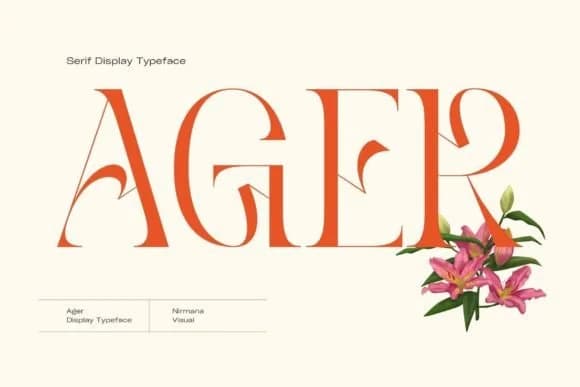
Picture a luxury wedding invitation arriving in the mail. Ager, designed by Sigit Dwipa, is a slab serif typeface that channels the elegance of Art Nouveau into contemporary typography. With its bold geometric forms and refined proportions, this face becomes the considered choice for projects where heritage and modernity need to coexist with visual authority.
Ager shines in high-impact applications where heritage matters. Luxury restaurant branding and wine label design benefit from its authoritative presence. Vintage-inspired magazine spreads and editorial mastheads gain a sense of editorial dignity. Boutique skincare packaging with a gallery-like feel reads sophisticated rather than trendy. Handcrafted product labels and artisan shop signage let Ager anchor a cohesive visual identity. Its slab serif proportions hold their own at display sizes, making headlines pop with character without overwhelming the space. From small label accents to full-page magazine covers, the geometric structure stays crisp and legible even when pushed to large sizes.
Ager's versatility within the retro-modern aesthetic keeps it grounded in both tradition and contemporary taste. It works equally well for established luxury brands and upstart designers building their first visual systems. You'll find Ager on Creative Fabrica, ready to add depth and character to your work.
Style & Use Cases
- Overall Style
- Sturdy, Confident, Serif
- Use Case
- Headlines, Merch
- Ideal For
- vintage posters, logos, and product packaging
- Pairs With
- a light sans-serif
How to Install Ager Font
Step-by-step instructions for every platform
- 1Download the Ager font file (.ttf or .otf).
- 2Locate the downloaded file in your Downloads folder.
- 3Right-click the font file.
- 4Select "Install" to install for the current user, or "Install for all users" to make it available system-wide.
- 5Ager is now available in Word, Photoshop, Illustrator, and all other apps.
More by Sigit Dwipa
View all →
Browse fonts by theme
Curated collections →Saw a font in a picture? Identify any font from an image with our free Font Finder.
More Slab Serif Fonts
Browse all →







What pairs well with Ager Font?
Ager Font is a slab serif font that shines as a display or heading face. Pair it with a clean sans-serif or serif font for body text — the contrast creates a clear hierarchy while the two styles stay balanced and easy to read.



Ager Font
by Sigit Dwipa
Reviewed by the FontBoxDL team · Updated October 2026