 Firefox
 1 / 8
1 / 8About Adelard Font
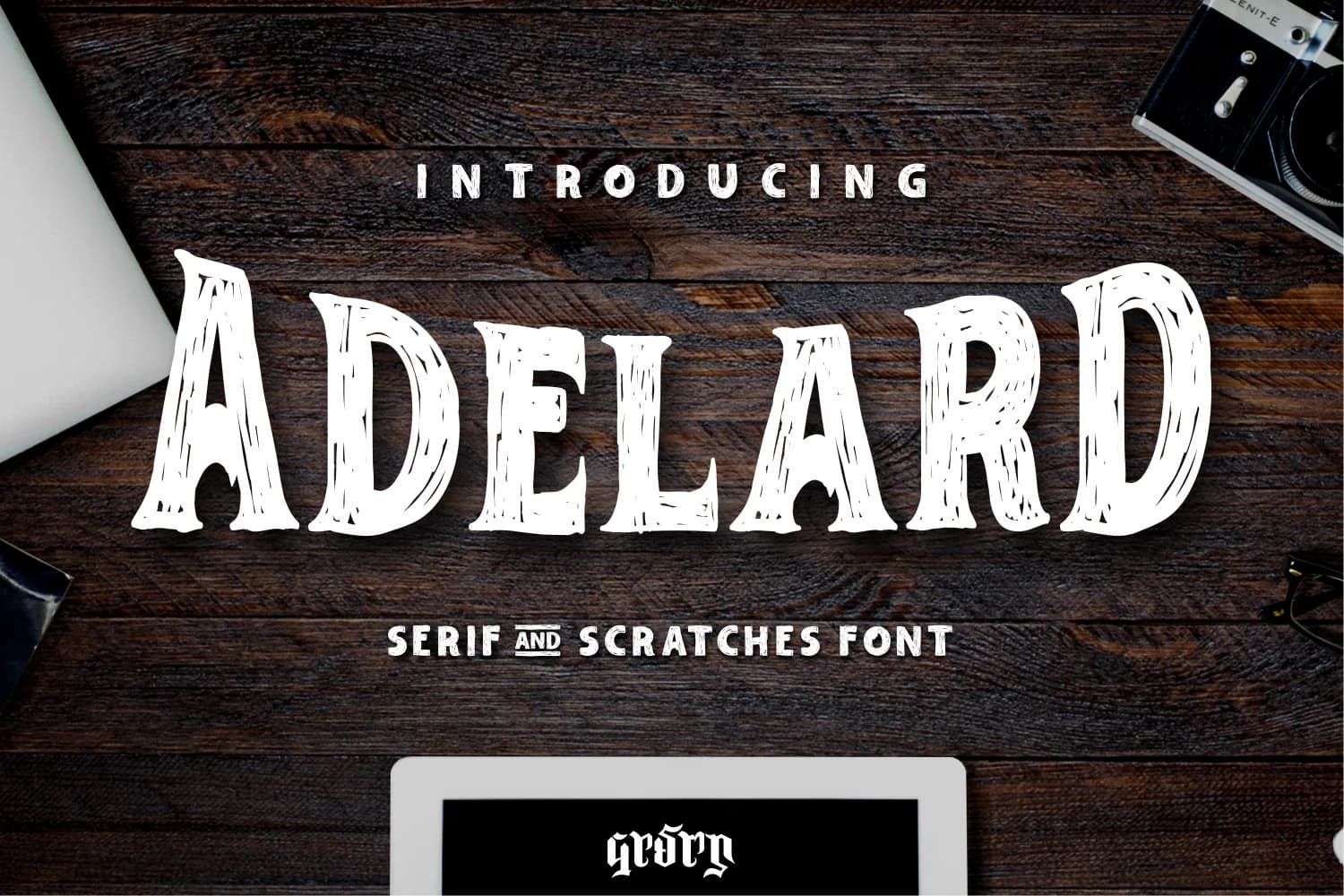
The textured surface of Adelard, designed by Garisman Studio, carries visible marks and distressed edges that give it a distinctly warm, handcrafted character. Unlike fonts engineered for maximum refinement, this slab serif trades polish for genuine personality. Each letter shows the texture of being drawn and weathered by hand rather than constructed from smooth digital curves.
Adelard shines in Halloween campaign posters where the gritty aesthetic matches the seasonal mood perfectly. Boutique fashion lookbooks and brand identity systems gain from its ability to signal authenticity and visual personality to customers at a glance. Magazine cover headlines command real presence through its textured weight and bold proportions. Product packaging labels work particularly well for craft goods, artisanal skincare, or small-batch food businesses where customers expect a handmade touch. Logo design for lifestyle and creative brands suits this typeface beautifully. App interfaces can capture its distinctive character too, especially when targeting creative professionals or vintage-inspired digital services.
The font's roughness prevents it from reading as generic copy, no matter how straightforward the application. It's the kind of typeface you reach for when your project demands character over neutral efficiency and polish. Find Adelard on Creative Fabrica and start applying it across your campaign materials, packaging, and digital projects.
Style & Use Cases
- Overall Style
- Sturdy, Confident, Slab Serif
- Use Case
- Headlines, Merch
- Ideal For
- vintage posters, logos, and product packaging
- Pairs With
- a light sans-serif
How to Install Adelard Font
Step-by-step instructions for every platform
- 1Download the Adelard font file (.ttf or .otf).
- 2Locate the downloaded file in your Downloads folder.
- 3Right-click the font file.
- 4Select "Install" to install for the current user, or "Install for all users" to make it available system-wide.
- 5Adelard is now available in Word, Photoshop, Illustrator, and all other apps.
More by Garisman Studio
View all →
Browse fonts by theme
Curated collections →Saw a font in a picture? Identify any font from an image with our free Font Finder.
More Slab Serif Fonts
Browse all →







What pairs well with Adelard Font?
Adelard Font is a slab serif font that shines as a display or heading face. Pair it with a clean sans-serif or serif font for body text — the contrast creates a clear hierarchy while the two styles stay balanced and easy to read.



Adelard Font
Reviewed by the FontBoxDL team · Updated September 2026