
 1 / 8
1 / 8About Warm Snow Font
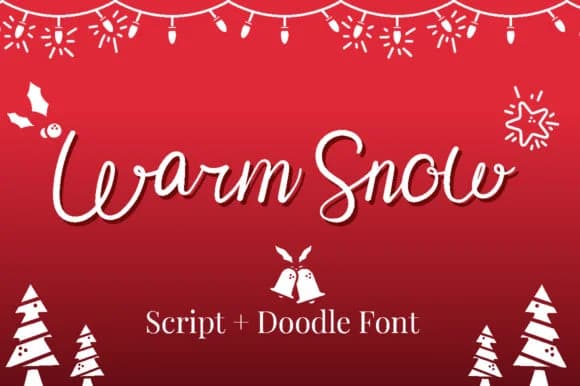
Warm Snow Font by attypestudio is a handwritten script typeface that brings a cozy, organic aesthetic to winter and holiday design projects. The font's natural, flowing letterforms reflect genuine handwriting qualities while maintaining excellent legibility across various applications and sizes. Its accompanying collection of 26 winter-themed dingbats provides designers with a complete decorative toolkit for cohesive seasonal work, eliminating the need to juggle multiple files.
These complementary ornamental characters enhance a wide range of festive applications, from Christmas greeting card suites and holiday product packaging designs to winter event invitation collections and seasonal marketing materials. The script's gentle warmth and the dingbats' thematic relevance make them particularly effective for handmade-inspired brand identities where authentic, personal aesthetics matter. Whether you're creating boutique holiday skincare labels, designing Christmas-themed stationery sets, developing custom gift tag collections, or crafting festive social media graphics, this integrated font system delivers visual consistency without requiring designers to source decorative elements across multiple typeface purchases.
The character set shows careful attention to maintaining hand-drawn warmth throughout, with each ornament thoughtfully designed to complement the script's personality rather than overshadow it. The dingbat range includes festive symbols and winter motifs that enhance holiday communications naturally. This font represents the kind of focused, purposeful design that transforms seasonal projects from competent to characterful. Get Warm Snow Font on Creative Fabrica and bring authentic warmth to your seasonal design work.
How to Install Warm Snow Font Font
Step-by-step instructions for every platform
- 1Download the Warm Snow Font font file (.ttf or .otf).
- 2Locate the downloaded file in your Downloads folder.
- 3Right-click the font file.
- 4Select "Install" to install for the current user, or "Install for all users" to make it available system-wide.
- 5Warm Snow Font is now available in Word, Photoshop, Illustrator, and all other apps.
More by attypestudio
View all →


Browse fonts by theme
Curated collections →Saw a font in a picture? Identify any font from an image with our free Font Finder.
More Fonts
Browse all →


What pairs well with Warm Snow Font?
Warm Snow Font is a versatile font that works for both headings and body text. Pair it with a contrasting sans-serif or serif font to add visual interest and a clear distinction between titles and body copy.



Warm Snow Font
by attypestudio
Reviewed by the FontBoxDL team · Updated May 2026