
 1 / 8
1 / 8About Vintage Bunny Font
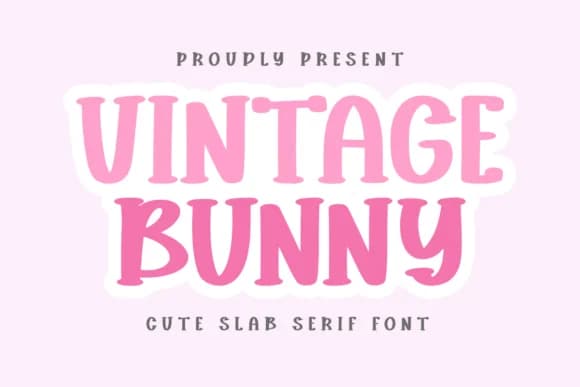
Vintage Bunny from CraftedType Studio features chunky, friendly slab-serif letterforms with rounded edges and a nostalgic charm that reads as both whimsical and genuinely approachable. The characters carry that handcrafted quality which makes people smile the moment they see it set in type, with visual warmth baked into every letter. It's the kind of typeface that feels like a hug on the page.
This font shines in projects where genuine personality matters: baby shower invitation suites, daily planner spreads, activity book pages, and journal cover designs all benefit immediately from its soft, inviting presence. Bookmark designs, Notion template headers, envelope addressing, and laser-cut signage work equally well since the thick, confident strokes hold beautifully at any scale. Instagram story overlays, ebook covers, and small-batch product label designs round out the full range of applications this typeface handles without hesitation. That doodle-like quality in the letterforms keeps everything feeling handmade even at larger sizes or when printed on varied materials.
Anyone creating handmade-feeling content will connect with this font right away. DIY crafters building personal stationery systems, small businesses establishing cozy brand identities, and creative professionals seeking warmth in their visual work will all find what they need here. Grab Vintage Bunny on Creative Fabrica and start layering it into your next project.
Style & Use Cases
- Overall Style
- Sturdy, Confident, Activity Book
- Use Case
- Headlines, Merch
- Ideal For
- vintage posters, logos, and product packaging
- Pairs With
- a light sans-serif
How to Install Vintage Bunny Font
Step-by-step instructions for every platform
- 1Download the Vintage Bunny font file (.ttf or .otf).
- 2Locate the downloaded file in your Downloads folder.
- 3Right-click the font file.
- 4Select "Install" to install for the current user, or "Install for all users" to make it available system-wide.
- 5Vintage Bunny is now available in Word, Photoshop, Illustrator, and all other apps.
More by CraftedType Studio
View all →



Browse fonts by theme
Curated collections →Saw a font in a picture? Identify any font from an image with our free Font Finder.
More Slab Serif Fonts
Browse all →







What pairs well with Vintage Bunny Font?
Vintage Bunny Font is a slab serif font that shines as a display or heading face. Pair it with a clean sans-serif or serif font for body text — the contrast creates a clear hierarchy while the two styles stay balanced and easy to read.



Vintage Bunny Font
Reviewed by the FontBoxDL team · Updated August 2026