
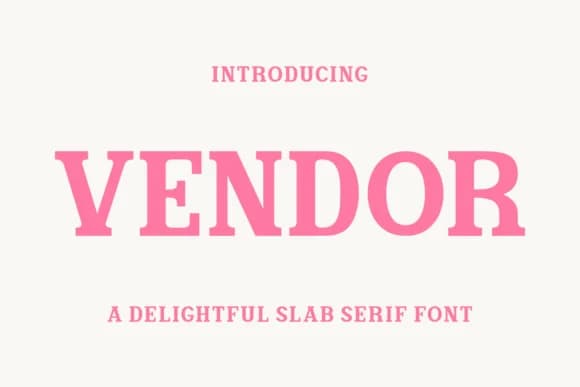
 1 / 5
1 / 5About Vendor Font
The thick, squared serifs in Vendor give it a confident, grounded presence that works equally well on a book spine or magazine masthead. Designed by Eightde, this slab serif typeface combines sturdy geometry with refined proportions that feel both contemporary and timeless. What sets it apart is how the weight distributes evenly across every letterform, avoiding the top-heavy imbalance that can plague slab serifs when they're rushed.
Fashion lookbooks and high-end beauty packaging benefit from Vendor's structural clarity and visual presence. The typeface handles editorial layout work with ease, making it a solid choice for magazine spreads and book covers that need typographic weight to anchor the page. Luxury brand identity systems also benefit from this typeface's ability to communicate sophistication without becoming precious or decorative. Boutique product packaging, premium advertising campaigns, and gallery collateral all reveal how well Vendor performs when the typeface itself needs to carry visual authority. It has genuine personality without relying on gimmick or unnecessary flourish.
Vendor suits any project where serif weight and visual stability need to carry the design work, without embellishment or trend-chasing muddying the message. It's available on Creative Fabrica.
Style & Use Cases
- Overall Style
- Sturdy, Confident, Slab Serif Typeface
- Use Case
- Headlines, Merch
- Ideal For
- vintage posters, logos, and product packaging
- Pairs With
- a light sans-serif
How to Install Vendor Font
Step-by-step instructions for every platform
- 1Download the Vendor font file (.ttf or .otf).
- 2Locate the downloaded file in your Downloads folder.
- 3Right-click the font file.
- 4Select "Install" to install for the current user, or "Install for all users" to make it available system-wide.
- 5Vendor is now available in Word, Photoshop, Illustrator, and all other apps.
Browse fonts by theme
Curated collections →Saw a font in a picture? Identify any font from an image with our free Font Finder.
More Slab Serif Fonts
Browse all →







What pairs well with Vendor Font?
Vendor Font is a slab serif font that shines as a display or heading face. Pair it with a clean sans-serif or serif font for body text — the contrast creates a clear hierarchy while the two styles stay balanced and easy to read.



Vendor Font
by Eightde
Reviewed by the FontBoxDL team · Updated August 2026