
 1 / 3
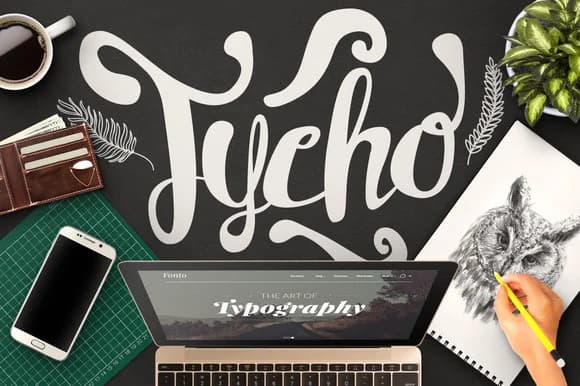
1 / 3About Tycho Font
Tycho Font by maulanacreative is a delicate script with hairline strokes and a light, airy quality that brings understated refinement to creative work. The typeface captures the organic flow of handwritten lettering while maintaining a polished, contemporary edge. Rather than mimicking casual penmanship, Tycho balances elegance with accessibility, making each letterform feel both personal and professional. A curated set of ornaments extends the font's design vocabulary, offering subtle embellishments for headers, dividers, and decorative accents throughout your layouts.
This graceful script excels across luxury beauty packaging, minimalist event stationery, personalized gift labels, and carefully curated social media aesthetics. The slender letterforms pair seamlessly with modern layouts and vintage-inspired designs alike, adapting easily to both digital and print applications. The hairline weight gives Tycho a distinctly refined appearance, perfect for projects where restrained sophistication matters more than bold visual impact. Whether you're crafting a wedding invitation suite, designing boutique product labels, creating handmade stationery collections, or developing cohesive brand identities, Tycho's refined character brings an artisanal quality without sacrificing readability across different media and sizes.
Discover how Tycho Font can add sophistication and personality to your next design on Creative Fabrica.
Style & Use Cases
- Overall Style
- Elegant, Flowing, Tycho
- Use Case
- Invitations, Branding
- Ideal For
- wedding stationery, greeting cards, and signatures
- Pairs With
- a simple uppercase sans
How to Install Tycho Font Font
Step-by-step instructions for every platform
- 1Download the Tycho Font font file (.ttf or .otf).
- 2Locate the downloaded file in your Downloads folder.
- 3Right-click the font file.
- 4Select "Install" to install for the current user, or "Install for all users" to make it available system-wide.
- 5Tycho Font is now available in Word, Photoshop, Illustrator, and all other apps.
More by maulanacreative
View all →
More Script Handwritten Fonts
Browse all →







What pairs well with Tycho Font?
Tycho Font is a script font that shines as a display or heading face. Pair it with a clean sans-serif or serif font for body text — the contrast creates a clear hierarchy while the two styles stay balanced and easy to read.



Tycho Font
Reviewed by the FontBoxDL team · Updated May 2026