
 1 / 8
1 / 8About Sinoba Outline Font
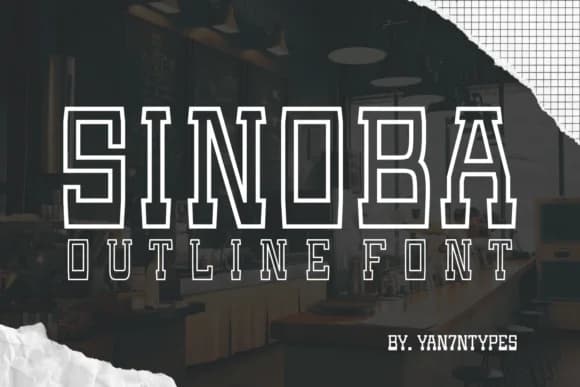
This font delivers bold, graphic impact without aggression. Sinoba Outline, crafted by Yan of 7NTypes, is a slab-serif defined entirely by its hollow structure. Instead of solid letterforms, you get the outline principle taken fully: characters that feel dimensional, substantial, and commanding in a way solid fonts simply cannot match.
The outline approach makes it brilliant for high-stakes, attention-demanding work. Think magazine cover headlines that need to dominate the spread, sports event posters, social media graphics competing for precious scrolling real estate, and premium product packaging where the typography itself becomes part of the brand story. That hollow effect performs equally across print and digital contexts without sacrificing visual punch. Each letterform carries weight through the outline alone, building the kind of depth that solid fonts just cannot deliver. You're getting slab-serif substance fused with graphic novelty, which pushes it well past ornament into genuinely functional territory. The outline treatment itself becomes an asset, giving you dimensionality that fill-based letterforms never quite match.
Pair Sinoba Outline with a clean, legible sans-serif for body text and captions, letting each font do what it does best. Pick it up on Creative Fabrica and add that dimensional backbone to any project demanding real presence and stopping power.
Style & Use Cases
- Overall Style
- Sturdy, Confident, Serif Font
- Use Case
- Headlines, Merch
- Ideal For
- vintage posters, logos, and product packaging
- Pairs With
- a light sans-serif
How to Install Sinoba Outline Font
Step-by-step instructions for every platform
- 1Download the Sinoba Outline font file (.ttf or .otf).
- 2Locate the downloaded file in your Downloads folder.
- 3Right-click the font file.
- 4Select "Install" to install for the current user, or "Install for all users" to make it available system-wide.
- 5Sinoba Outline is now available in Word, Photoshop, Illustrator, and all other apps.
More by Yan (7NTypes)
View all →


Browse fonts by theme
Curated collections →Saw a font in a picture? Identify any font from an image with our free Font Finder.
More Slab Serif Fonts
Browse all →







What pairs well with Sinoba Outline Font?
Sinoba Outline Font is a slab serif font that shines as a display or heading face. Pair it with a clean sans-serif or serif font for body text — the contrast creates a clear hierarchy while the two styles stay balanced and easy to read.



Sinoba Outline Font
Reviewed by the FontBoxDL team · Updated August 2026