
 1 / 9
1 / 9About Sild Font
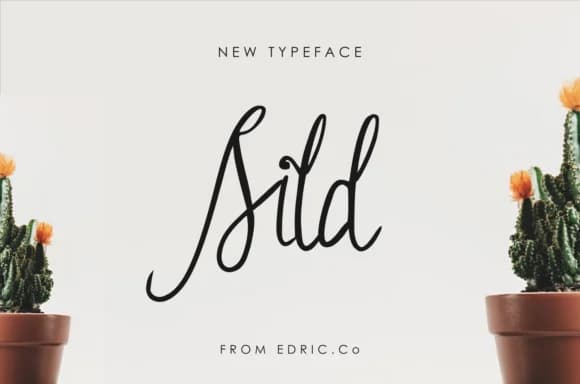
There's something genuinely personal about a font that feels like it was written by hand. Sild, created by EdricStudio, brings that intimate, flowing quality to your design work with its graceful curves and natural rhythm. Available in regular and italic versions, it gives you flexibility to shift emphasis or create visual interest within a single composition.
Wedding invitation suites absolutely shine with this kind of handwritten warmth, as do high-end gift labels and calligraphy-style certificates for special occasions. You might also reach for Sild when designing hand-lettered brand packaging for boutique skincare or specialty goods, or when you need to add elegance to social media captions and headers that benefit from a personal touch. The italic variation works beautifully when you want to add emphasis or create a lighter secondary voice without stepping too far outside your chosen visual personality.
Pair Sild with a clean, modern sans-serif for body text or longer copy blocks. That natural contrast between handwritten grace and readable simplicity keeps your designs feeling both refined and approachable. Find Sild on Creative Fabrica and bring this flowing script to your design toolkit.
Style & Use Cases
- Overall Style
- Elegant, Flowing, Sild Regular
- Use Case
- Invitations, Branding
- Ideal For
- wedding stationery, greeting cards, and signatures
- Pairs With
- a simple uppercase sans
How to Install Sild Font Font
Step-by-step instructions for every platform
- 1Download the Sild Font font file (.ttf or .otf).
- 2Locate the downloaded file in your Downloads folder.
- 3Right-click the font file.
- 4Select "Install" to install for the current user, or "Install for all users" to make it available system-wide.
- 5Sild Font is now available in Word, Photoshop, Illustrator, and all other apps.
More by EdricStudio
View all →


Browse fonts by theme
Curated collections →Saw a font in a picture? Identify any font from an image with our free Font Finder.
More Script Handwritten Fonts
Browse all →







What pairs well with Sild Font?
Sild Font is a script font that shines as a display or heading face. Pair it with a clean sans-serif or serif font for body text — the contrast creates a clear hierarchy while the two styles stay balanced and easy to read.



Sild Font
by EdricStudio
Reviewed by the FontBoxDL team · Updated May 2026