
 1 / 8
1 / 8About Shiny Snowflake Font
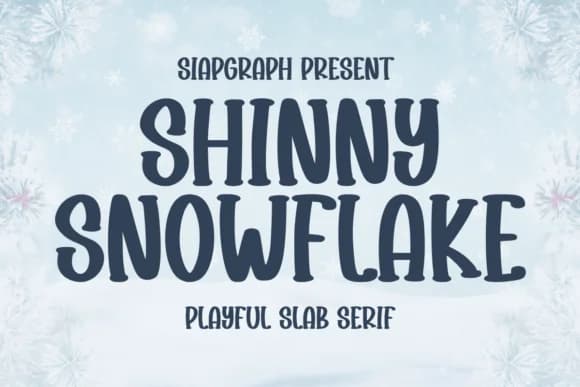
Shiny Snowflake from SiapGraph builds its character around chunky, rounded serifs that soften the weight of each letter while maintaining boldness. This slab serif design balances heavy, confident strokes with playful proportions throughout the full character set, creating a typeface that feels both substantial and approachable. The thick serifs catch light in a way that justifies the name and gives every letter an eye-catching presence on the page.
Unlike stripped-down sans serifs, this font has personality in every letterform, which matters for projects needing warmth and visual weight. Christmas greeting cards and festive packaging become far more engaging with these blocky, cartoonish forms. Thanksgiving dinner labels and place cards gain a handmade quality that generic fonts struggle to achieve. 3D tumbler wraps and mini calendar designs require typefaces with enough heft to read clearly at small scale and from a distance, which this font handles with ease. Tattoo designers and comic illustrators often reach for it because the bold, confident line work translates beautifully to their medium.
The font is most at home with anyone building seasonal, character-driven, or celebration-focused designs where precision would actually feel wrong. Grab Shiny Snowflake on Creative Fabrica and add it to your next holiday project.
Style & Use Cases
- Overall Style
- Sturdy, Confident, Fun
- Use Case
- Headlines, Merch
- Ideal For
- vintage posters, logos, and product packaging
- Pairs With
- a light sans-serif
How to Install Shiny Snowflake Font
Step-by-step instructions for every platform
- 1Download the Shiny Snowflake font file (.ttf or .otf).
- 2Locate the downloaded file in your Downloads folder.
- 3Right-click the font file.
- 4Select "Install" to install for the current user, or "Install for all users" to make it available system-wide.
- 5Shiny Snowflake is now available in Word, Photoshop, Illustrator, and all other apps.
More by SiapGraph
View all →


Browse fonts by theme
Curated collections →Saw a font in a picture? Identify any font from an image with our free Font Finder.
More Slab Serif Fonts
Browse all →







What pairs well with Shiny Snowflake Font?
Shiny Snowflake Font is a slab serif font that shines as a display or heading face. Pair it with a clean sans-serif or serif font for body text — the contrast creates a clear hierarchy while the two styles stay balanced and easy to read.



Shiny Snowflake Font
by SiapGraph
Reviewed by the FontBoxDL team · Updated August 2026