
 1 / 7
1 / 7About Second Life Font
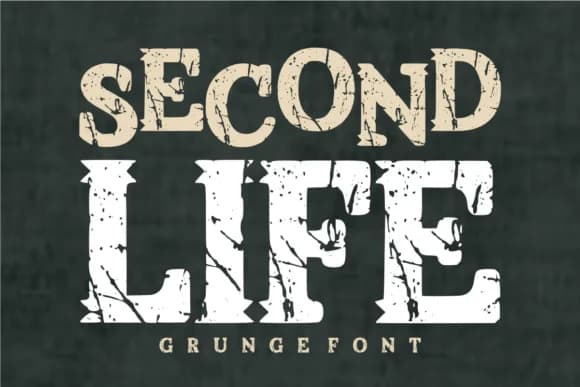
Second Life by TaralArt is a slab-serif display font built on bold geometric blocks with aggressive grunge texture throughout its full character set. The angular cut-outs carved deliberately into each letter create a rough, weathered quality that feels both industrial and genuinely hard-edged, like type that has lived through something real and unpolished.
This typeface hits hardest wherever texture matters more than refinement. Athletic team jerseys gain immediate visual presence from its commanding weight and natural readability at any size, while vintage-inspired t-shirt graphics tap into the distressed character that makes Second Life distinctive. Cricut vinyl cutting projects take on real grit when built around its chunky, bold letter forms, and the font serves equally well for grunge-heavy band merchandise, spooky Halloween designs, distressed signage, or any project built on that authentically worn-down aesthetic. The heavy slab structure pairs beautifully with thick outlines or two-color treatments, making it dependable for logos and signage that need to convey toughness and attitude.
Get Second Life on Creative Fabrica whenever you're ready to bring this kind of grunge and raw character to your next project.
Style & Use Cases
- Overall Style
- Sturdy, Confident, Second Life
- Use Case
- Headlines, Merch
- Ideal For
- vintage posters, logos, and product packaging
- Pairs With
- a light sans-serif
How to Install Second Life Font
Step-by-step instructions for every platform
- 1Download the Second Life font file (.ttf or .otf).
- 2Locate the downloaded file in your Downloads folder.
- 3Right-click the font file.
- 4Select "Install" to install for the current user, or "Install for all users" to make it available system-wide.
- 5Second Life is now available in Word, Photoshop, Illustrator, and all other apps.
More by TaralArt
View all →


Browse fonts by theme
Curated collections →Saw a font in a picture? Identify any font from an image with our free Font Finder.
More Slab Serif Fonts
Browse all →







What pairs well with Second Life Font?
Second Life Font is a slab serif font that shines as a display or heading face. Pair it with a clean sans-serif or serif font for body text — the contrast creates a clear hierarchy while the two styles stay balanced and easy to read.



Second Life Font
by TaralArt
Reviewed by the FontBoxDL team · Updated September 2026