
 1 / 9
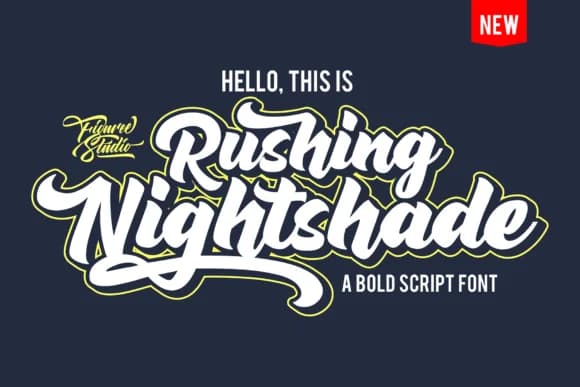
1 / 9About Rushing Nightshade Font
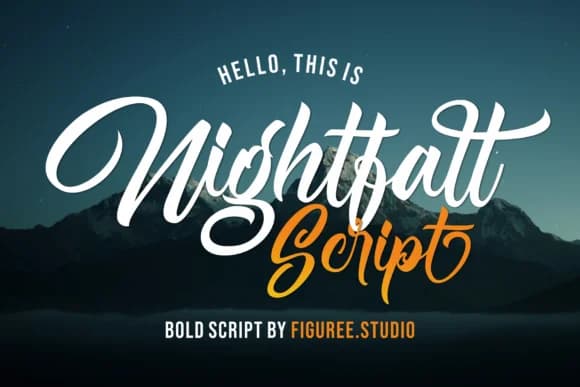
Rushing Nightshade by figuree studio is a bold, natural script that draws strength from vintage design traditions. The typeface carries that authentic handwritten quality which makes letters feel alive and personal, yet it performs reliably across different applications and scales. There's real retro charm to it, but the weight and confidence prevent it from feeling delicate or precious. The letterforms move with an easy, organic rhythm that suggests motion and spontaneity without sacrificing legibility.
This is the kind of script that brings genuine handwritten character without compromising on practical typography. Wedding invitation suites benefit deeply from its nostalgic warmth, while vintage-inspired product labels for independent makers and artisan brands gain real presence and personality. Custom greeting card collections, boutique packaging design, and heritage brand identities all find natural expression here. The bold weight means it performs well on signage or social media graphics, and it holds up beautifully when stamped on luxury stationery or embossed on product boxes. Use it for hand-lettered branding projects that need substance and soul, or anywhere you're chasing that handcrafted aesthetic with solid typography underneath.
Find this font on Creative Fabrica when you're ready to add vintage script character to your work.
Style & Use Cases
- Overall Style
- Elegant, Flowing, Rushing Nightshade
- Use Case
- Invitations, Branding
- Ideal For
- wedding stationery, greeting cards, and signatures
- Pairs With
- a simple uppercase sans
How to Install Rushing Nightshade Font Font
Step-by-step instructions for every platform
- 1Download the Rushing Nightshade Font font file (.ttf or .otf).
- 2Locate the downloaded file in your Downloads folder.
- 3Right-click the font file.
- 4Select "Install" to install for the current user, or "Install for all users" to make it available system-wide.
- 5Rushing Nightshade Font is now available in Word, Photoshop, Illustrator, and all other apps.
More by figuree studio
View all →
Browse fonts by theme
Curated collections →Saw a font in a picture? Identify any font from an image with our free Font Finder.
More Script Handwritten Fonts
Browse all →







What pairs well with Rushing Nightshade Font?
Rushing Nightshade Font is a script font that shines as a display or heading face. Pair it with a clean sans-serif or serif font for body text — the contrast creates a clear hierarchy while the two styles stay balanced and easy to read.



Rushing Nightshade Font
Reviewed by the FontBoxDL team · Updated August 2026