
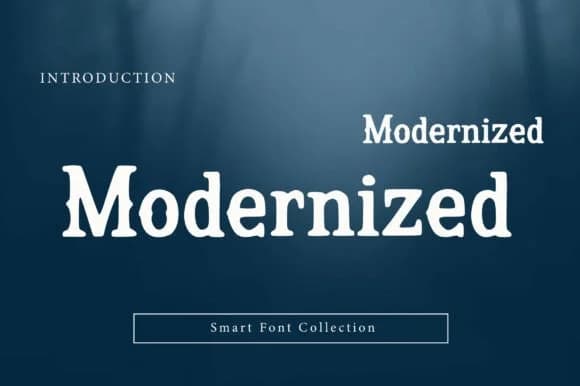
 1 / 5
1 / 5About Modernized Font
When you're designing a boutique skincare label or laying out a small-press book cover, you need a serif that feels both serious and approachable without ever reading as cold or corporate. Modernized, from Wow Magic, is a slab-serif display font with confident weight yet softened terminals, making it equally at home in minimalist magazine spreads or retro-inspired product identities. The typeface strips away stuffiness while keeping the structural integrity of classic serifs, landing somewhere between contemporary and vintage sensibility in a way that feels intentional rather than confused.
The heavy proportions read brilliantly at display sizes, which makes it a natural choice for indie press book covers, artisan coffee packaging, boutique cosmetics labels, and editorial mastheads where you want presence without coldness. It carries authority convincingly, and the refined stroke details prevent that dated quality you often encounter with bold serifs. This is a font that works equally well for minimal, clean lockups and retro-inspired branding projects, giving you genuine flexibility across different design directions and contexts.
The bold weight holds up beautifully across labels and signage at any scale, making it practical for everything from commanding headlines to smaller supporting branding applications. Grab Modernized on Creative Fabrica and add a display serif that actually bridges modern simplicity with genuine vintage character.
Style & Use Cases
- Overall Style
- Sturdy, Confident, Modernized
- Use Case
- Headlines, Merch
- Ideal For
- vintage posters, logos, and product packaging
- Pairs With
- a light sans-serif
How to Install Modernized Font
Step-by-step instructions for every platform
- 1Download the Modernized font file (.ttf or .otf).
- 2Locate the downloaded file in your Downloads folder.
- 3Right-click the font file.
- 4Select "Install" to install for the current user, or "Install for all users" to make it available system-wide.
- 5Modernized is now available in Word, Photoshop, Illustrator, and all other apps.
More by Wow Magic
View all →
Browse fonts by theme
Curated collections →Saw a font in a picture? Identify any font from an image with our free Font Finder.
More Slab Serif Fonts
Browse all →







What pairs well with Modernized Font?
Modernized Font is a slab serif font that shines as a display or heading face. Pair it with a clean sans-serif or serif font for body text — the contrast creates a clear hierarchy while the two styles stay balanced and easy to read.



Modernized Font
by Wow Magic
Reviewed by the FontBoxDL team · Updated August 2026