
 1 / 7
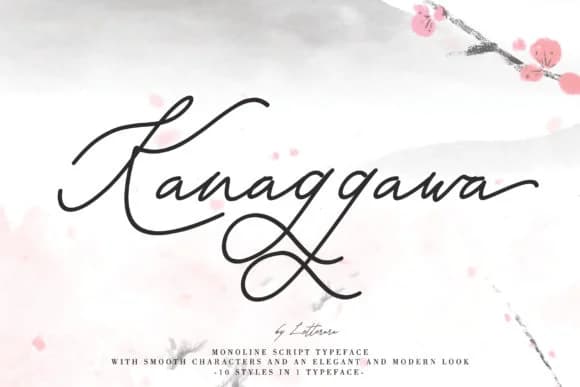
1 / 7About Kanaggawa Font
Kanaggawa draws its strength from flowing, broad letterforms that command attention through confident swashes and energetic strokes. Designed by thomasaradea, the font bridges the gap between delicate grace and substantial presence, offering script sensibility with real impact on the page. What sets it apart is how readable it remains even at display sizes, thanks to letterforms that balance ornamental flourish with clarity and purpose.
This typeface shines in luxury packaging design, from boutique cosmetics labels and artisanal tea packaging to handmade jewelry branding. Wedding invitation suites and greeting card designs both benefit from its warmth and personality. It performs equally well in logo work for creative studios and on DIY craft signage, where its swashes contribute genuine character without tipping into ornamental excess. The font family spans thin, light, semi-bold, and bold weights, each with matching italic versions, so you can dial in exactly the visual weight and personality your project requires.
Kanaggawa works best for designers and small business owners seeking script character without compromising legibility or professional polish. If you're building luxury brand packaging, wedding collateral, or creative studio branding, the letterforms deliver both warmth and sophistication. Find it on Creative Fabrica to add to your working library.
Style & Use Cases
- Overall Style
- Elegant, Flowing, Kanaggawa
- Use Case
- Invitations, Branding
- Ideal For
- wedding stationery, greeting cards, and signatures
- Pairs With
- a simple uppercase sans
How to Install Kanaggawa Font Font
Step-by-step instructions for every platform
- 1Download the Kanaggawa Font font file (.ttf or .otf).
- 2Locate the downloaded file in your Downloads folder.
- 3Right-click the font file.
- 4Select "Install" to install for the current user, or "Install for all users" to make it available system-wide.
- 5Kanaggawa Font is now available in Word, Photoshop, Illustrator, and all other apps.
More by thomasaradea
View all →
Browse fonts by theme
Curated collections →Saw a font in a picture? Identify any font from an image with our free Font Finder.
More Script Handwritten Fonts
Browse all →







What pairs well with Kanaggawa Font?
Kanaggawa Font is a script font that shines as a display or heading face. Pair it with a clean sans-serif or serif font for body text — the contrast creates a clear hierarchy while the two styles stay balanced and easy to read.



Kanaggawa Font
by thomasaradea
Reviewed by the FontBoxDL team · Updated August 2026