
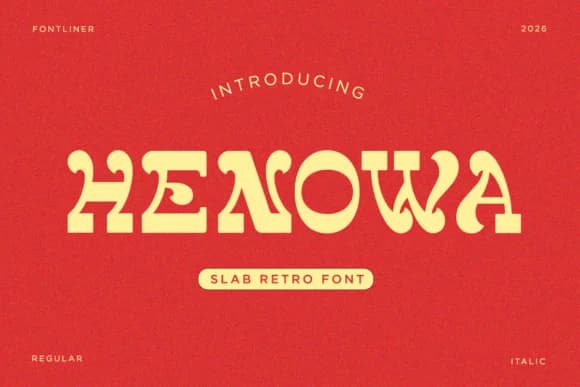
 1 / 8
1 / 8About Henowa Font
Henowa by SayStudio is a bold slab-serif defined by chunky, geometric letterforms that draw their energy from 1970s and 80s design culture. The forms carry a friendly warmth that reads loud without feeling aggressive, which is exactly what you want when something needs to stop traffic and hold attention. This isn't a typeface trying to be subtle or clever; it's built to command the room through sheer strength of character.
You'll find genuine use for this one with streetwear labels and vintage-style café signage where that groove-era energy actually needs to land as intended. Packaging for craft cosmetics and small-batch food products works beautifully because the playful geometry suggests handmade quality without reading as amateurish. Record label artwork, music venue posters, and DIY craft shop branding all benefit from leaning into the font's chunky slab structure and visual confidence. The letterforms maintain excellent legibility across scales, from tight social media graphics to large display applications, which means you can use it for everything from a snug logo mark to a full, bold poster campaign without losing clarity or authentic impact.
Head to Creative Fabrica and grab your copy of Henowa to add some genuine retro warmth to your next project.
Style & Use Cases
- Overall Style
- Sturdy, Confident, Retro Font
- Use Case
- Headlines, Merch
- Ideal For
- vintage posters, logos, and product packaging
- Pairs With
- a light sans-serif
How to Install Henowa Font
Step-by-step instructions for every platform
- 1Download the Henowa font file (.ttf or .otf).
- 2Locate the downloaded file in your Downloads folder.
- 3Right-click the font file.
- 4Select "Install" to install for the current user, or "Install for all users" to make it available system-wide.
- 5Henowa is now available in Word, Photoshop, Illustrator, and all other apps.
More by SayStudio
View all →
Browse fonts by theme
Curated collections →Saw a font in a picture? Identify any font from an image with our free Font Finder.
More Slab Serif Fonts
Browse all →







What pairs well with Henowa Font?
Henowa Font is a slab serif font that shines as a display or heading face. Pair it with a clean sans-serif or serif font for body text — the contrast creates a clear hierarchy while the two styles stay balanced and easy to read.



Henowa Font
by SayStudio
Reviewed by the FontBoxDL team · Updated August 2026