
 1 / 8
1 / 8About Glaser Western Font
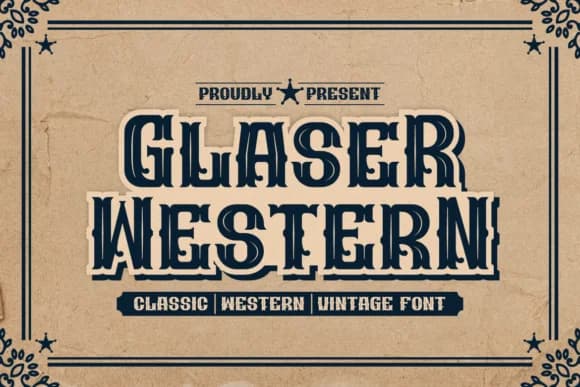
Picture a vintage saloon storefront or an old western movie title card, and you'll instantly recognize Glaser Western at work. Designed by qrdesignstd, this bold slab serif font brings authentic period character and visual authority to any project that genuinely needs retro gravitas. Built from chunky, substantial serifs and a condensed frame, each letter has an assertive, grounded presence that reads with unmistakable impact across any size, from compact labels to towering signage.
This font excels on vintage whiskey and spirits labels, concert posters with that classic 1970s aesthetic, sports team branding, and wanted poster designs. The distressed texture woven into the letterforms adds genuine grit and raw character without ever feeling overwrought or purely ornamental. What designers consistently appreciate is how cleanly it walks the line between playful nostalgia and genuine utility. It's not a one-trick novelty font; instead, it functions as a versatile workhorse that brings real weight and credibility to projects demanding old-world authority and visual authenticity.
The condensed weight keeps long headlines tight and punchy, making it an ideal choice for any typographic composition where spacing and visual impact truly matter. Pick it up on Creative Fabrica, ready to download and integrate into your design collection.
Style & Use Cases
- Overall Style
- Sturdy, Confident, Typewriter
- Use Case
- Headlines, Merch
- Ideal For
- vintage posters, logos, and product packaging
- Pairs With
- a light sans-serif
How to Install Glaser Western Font
Step-by-step instructions for every platform
- 1Download the Glaser Western font file (.ttf or .otf).
- 2Locate the downloaded file in your Downloads folder.
- 3Right-click the font file.
- 4Select "Install" to install for the current user, or "Install for all users" to make it available system-wide.
- 5Glaser Western is now available in Word, Photoshop, Illustrator, and all other apps.
More by qrdesignstd
View all →
Browse fonts by theme
Curated collections →Saw a font in a picture? Identify any font from an image with our free Font Finder.
More Slab Serif Fonts
Browse all →







What pairs well with Glaser Western Font?
Glaser Western Font is a slab serif font that shines as a display or heading face. Pair it with a clean sans-serif or serif font for body text — the contrast creates a clear hierarchy while the two styles stay balanced and easy to read.



Glaser Western Font
by qrdesignstd
Reviewed by the FontBoxDL team · Updated September 2026