
 1 / 8
1 / 8About Djayanti Font
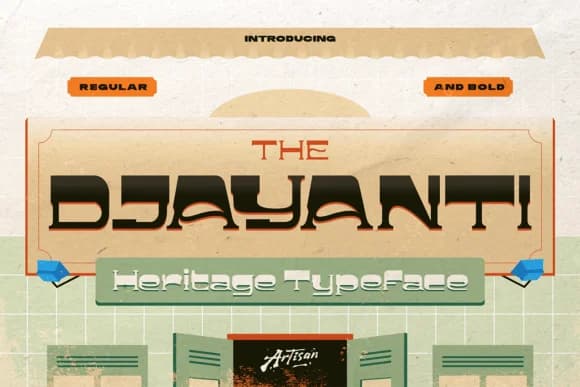
Djayanti is a bold slab serif from Artisan Themes that brings the unmistakable charm of traditional Southeast Asian signage into contemporary design work. The letters are shaped by playful curves and deliberate cut-ins that create visual texture and personality. This rhythm sits somewhere between heritage authenticity and modern editorial confidence, refusing to feel either too quaint or too slick.
The typeface draws genuine inspiration from kopitiam culture and translates that warmth into layouts that feel grounded and livable without sacrificing contemporary polish. You'll see it perform beautifully on café menu boards and restaurant branding where personality shapes the customer experience, on nostalgic poster campaigns that capture a specific era and mood, on boutique product packaging that tells a meaningful story, and on travel journal covers that set a contemplative, wandering tone. Both Regular and Bold weights are included, so you have the flexibility to size up for commanding headlines and logos while keeping the Regular for supporting text, navigation, and secondary information.
This font speaks to designers and art directors who work in editorial, heritage branding, or hospitality design, anyone building work that resists feeling generic. You'll find Djayanti on Creative Fabrica, ready to download and integrate into your design toolbox.
Style & Use Cases
- Overall Style
- Sturdy, Confident, Heritage Font
- Use Case
- Headlines, Merch
- Ideal For
- vintage posters, logos, and product packaging
- Pairs With
- a light sans-serif
How to Install Djayanti Font
Step-by-step instructions for every platform
- 1Download the Djayanti font file (.ttf or .otf).
- 2Locate the downloaded file in your Downloads folder.
- 3Right-click the font file.
- 4Select "Install" to install for the current user, or "Install for all users" to make it available system-wide.
- 5Djayanti is now available in Word, Photoshop, Illustrator, and all other apps.
More by Artisan Themes
View all →


Browse fonts by theme
Curated collections →Saw a font in a picture? Identify any font from an image with our free Font Finder.
More Slab Serif Fonts
Browse all →







What pairs well with Djayanti Font?
Djayanti Font is a slab serif font that shines as a display or heading face. Pair it with a clean sans-serif or serif font for body text — the contrast creates a clear hierarchy while the two styles stay balanced and easy to read.



Djayanti Font
Reviewed by the FontBoxDL team · Updated August 2026