
 1 / 8
1 / 8About Digital Papers Font
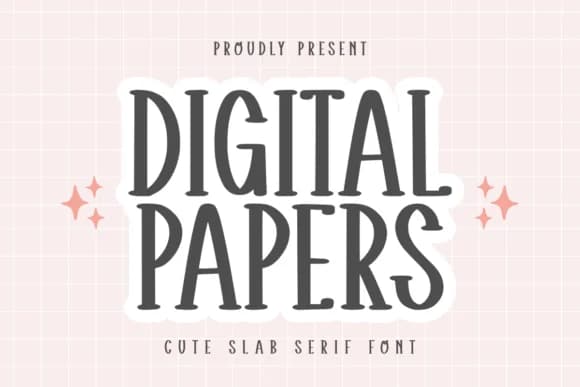
The tall, quirky letterforms in Digital Papers by CraftedType Studio create that rare balance between structured geometry and genuine warmth. This slab serif font channels a soft, approachable personality that feels equally at home on screen and in print, avoiding the heavyweight solidity you'd expect from a traditional slab serif. What sets these letterforms apart is their hybrid nature: they capture something closer to handwritten friendliness, complete with precise, almost architectural bones that keep everything legible and confidently on-brand.
Digital Papers excels across a surprisingly broad range of projects. Planner page layouts and journal cover designs benefit most from its personality, which lifts the familiar into something more thoughtful. Kids' stationery systems, DIY craft labels, and Etsy product packaging also come alive when this font takes the lead. The balance between playful and structured makes it appeal to designers who need genuine legibility without the corporate coldness of typical sans-serifs, and who want serif warmth without serif fussiness or excessive decorative detail.
Built for makers, journalers, and anyone building handmade or artisanal visual systems, this typeface delivers both sophistication and genuine approachability to the page and the screen. Find it on Creative Fabrica, where it's ready to anchor your next personal or commercial project with personality.
Style & Use Cases
- Overall Style
- Sturdy, Confident, Slab Serif Font
- Use Case
- Headlines, Merch
- Ideal For
- vintage posters, logos, and product packaging
- Pairs With
- a light sans-serif
How to Install Digital Papers Font
Step-by-step instructions for every platform
- 1Download the Digital Papers font file (.ttf or .otf).
- 2Locate the downloaded file in your Downloads folder.
- 3Right-click the font file.
- 4Select "Install" to install for the current user, or "Install for all users" to make it available system-wide.
- 5Digital Papers is now available in Word, Photoshop, Illustrator, and all other apps.
More by CraftedType Studio
View all →



Browse fonts by theme
Curated collections →Saw a font in a picture? Identify any font from an image with our free Font Finder.
More Slab Serif Fonts
Browse all →







What pairs well with Digital Papers Font?
Digital Papers Font is a slab serif font that shines as a display or heading face. Pair it with a clean sans-serif or serif font for body text — the contrast creates a clear hierarchy while the two styles stay balanced and easy to read.



Digital Papers Font
Reviewed by the FontBoxDL team · Updated August 2026