
 1 / 8
1 / 8About Bricktone Font
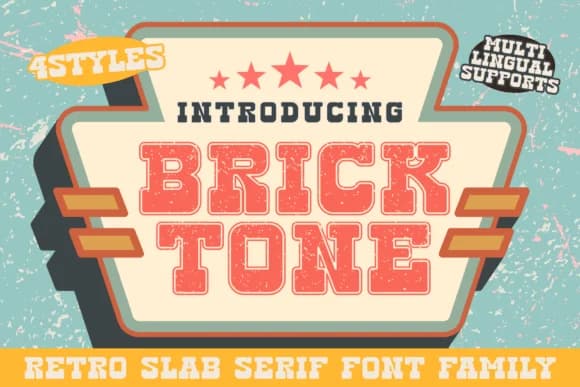
There's something deeply satisfying about a typeface that feels like it has genuine weight and permanence on the page. Bricktone, designed by Brown Cupple Fonts, is a slab serif that captures the rugged personality of mid-century athletic branding and warehouse signage. Its chunky serifs and solid letterforms speak to a time when typography had to work hard to grab attention, when boldness wasn't just a design choice but a necessity. The industrial edge resonates with anyone drawn to retro sports aesthetics.
This font comes alive on vintage athletic logos, varsity jersey graphics, and retro sports merchandise packaging. You could also put it to work on craft brewery labels, industrial-style wall art, and vintage-inspired concert posters. Even DIY enthusiasts find it suited to hand-painted sign designs and nostalgic sports bar decor. The character set includes multiple weights, giving you flexibility across different design scales. Proportionally chunky and tonally nostalgic, it's a natural choice for anyone pursuing an authentic throwback look without veering into pastiche.
Pair Bricktone with a clean, modern sans-serif for body copy to let the slab serif command the visual hierarchy. You'll find it ready on Creative Fabrica whenever you're in the mood to bring that raw, confident energy to your next project.
Style & Use Cases
- Overall Style
- Sturdy, Confident, Block
- Use Case
- Headlines, Merch
- Ideal For
- vintage posters, logos, and product packaging
- Pairs With
- a light sans-serif
How to Install Bricktone Font
Step-by-step instructions for every platform
- 1Download the Bricktone font file (.ttf or .otf).
- 2Locate the downloaded file in your Downloads folder.
- 3Right-click the font file.
- 4Select "Install" to install for the current user, or "Install for all users" to make it available system-wide.
- 5Bricktone is now available in Word, Photoshop, Illustrator, and all other apps.
More by Brown Cupple Fonts
View all →


Browse fonts by theme
Curated collections →Saw a font in a picture? Identify any font from an image with our free Font Finder.
More Slab Serif Fonts
Browse all →







What pairs well with Bricktone Font?
Bricktone Font is a slab serif font that shines as a display or heading face. Pair it with a clean sans-serif or serif font for body text — the contrast creates a clear hierarchy while the two styles stay balanced and easy to read.



Bricktone Font
Reviewed by the FontBoxDL team · Updated September 2026