
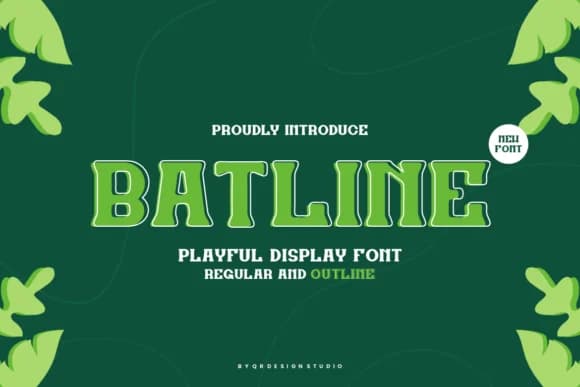
 1 / 8
1 / 8About Batline Font
You're designing a concert poster that needs to make people stop and look. Batline, designed by qrdesignstd, is a bold slab-serif that does exactly that. This condensed typeface has a distinctive personality - funky and unapologetically chunky, with the kind of geometric weight that makes type feel like a design element in its own right rather than just lettering. The font carries visual attitude in every letter.
Consider using it for situations where you need real presence and impact. Sports team merchandise, vintage racing graphics, Western saloon signage, and cyberpunk-influenced visuals all benefit from this kind of personality in their typography. The tall, minimal proportions and block structure give it a contemporary edge that older slab-serifs don't quite capture. Because it's condensed, you can pack it into tight spaces without losing any of that weight and impact, making it work equally well on album covers, music video title cards, concert merchandise, and small printed details on apparel or packaging.
What makes it work is how honest and straightforward it is. The slab-serif structure stays visible and strong even at large sizes, never dissolving into visual noise or feeling cramped. Grab Batline on Creative Fabrica and start adding this bold character to your library.
Style & Use Cases
- Overall Style
- Sturdy, Confident, Sport
- Use Case
- Headlines, Merch
- Ideal For
- vintage posters, logos, and product packaging
- Pairs With
- a light sans-serif
How to Install Batline Font
Step-by-step instructions for every platform
- 1Download the Batline font file (.ttf or .otf).
- 2Locate the downloaded file in your Downloads folder.
- 3Right-click the font file.
- 4Select "Install" to install for the current user, or "Install for all users" to make it available system-wide.
- 5Batline is now available in Word, Photoshop, Illustrator, and all other apps.
More by qrdesignstd
View all →
Browse fonts by theme
Curated collections →Saw a font in a picture? Identify any font from an image with our free Font Finder.
More Slab Serif Fonts
Browse all →







What pairs well with Batline Font?
Batline Font is a slab serif font that shines as a display or heading face. Pair it with a clean sans-serif or serif font for body text — the contrast creates a clear hierarchy while the two styles stay balanced and easy to read.



Batline Font
by qrdesignstd
Reviewed by the FontBoxDL team · Updated August 2026